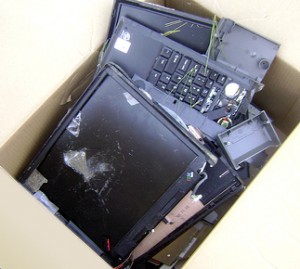
Before I start talking computer repair, I offer three caveats. First, I have no formal training in diagnosing, repairing, or even using computers. Second, I have no experience with repairing an Apple or Mac computer. Third, all of the below only applies to laptop repair. Its incredibly easy to swap out components on a desktop.
When I’m not buying computer or electronics components online, I like Best Buy for products and Fry’s for components. However, I would never have a computer diagnosed or repaired by either place.
First, let’s recognize that a big box store has certain priorities. As such, their staff are trained to sell, not to diagnose or repair. I imagine their priorities are, in order: (1) Sell you things, (2) sell you warranties for things, (3) sell you new things, and (4) sell you warranties for those new things, (5) LLR. 4 From a capitalistic perspective, its hard to argue with a business plan like this.
A little burned out component on the motherboard takes very special equipment and skill to replace. When faced with such a problem you can replace the entire computer, the motherboard5 , or just that one component.
From calling numerous computer repair facilities, I know very few of them have the special equipment and skill required to replace a single tiny component on a motherboard. If dedicated repair facilities do not typically have this equipment, I doubt big box stores would be up to the task.
I think everyone’s heard the horror stories or seen the TV investigations of big box computer store repair services scamming unwary or uninformed consumers. I have friends who hired Best Buy’s “Geek Squad” and still didn’t have their problems fixed.
If I were a very cynical person6 I’d suggest that big box stores hire untrained staff who have a vested interest in charging a diagnostic fee to tell you that your computer and all your data is beyond recovery.
Luckily, I believe the third option, finding a reliable dedicated computer repair shop, is your best bet.
Since the new WCAB rules became effective, the new EAMS forms are now mandatory. The exceptions named in the above bulletin are:
There will be a four-week “transition period” in effect through December 12, 2008 during which the “legacy”1 forms will still be accepted.
Forms requiring multiple signatures will be accepted in “legacy” form as long as the filer establishes that circulation began prior to November 17, 2008. 2
Unrepresented injured workers will be allowed until February 17, 2009 to use “legacy” forms.
Unrepresented injured workers who do not have access to a computer or typewriter will be allowed to fill in the new OCR forms by printing using block letters.34
Did you know there’s a handbook for the new Optical Character Recognition EAMS forms? You can check it out here or download it here:
Before I start talking computer repair, I offer three caveats. First, I have no formal training in diagnosing, repairing, or even using computers. Second, I have no experience with repairing an Apple or Mac computer. Third, all of the below only applies to laptop repair. Its incredibly easy to swap out components on a desktop.
When my laptop died back I Googled and called around trying to find and decide upon someone to repair my laptop. There are several possible options when it comes to choosing a laptop repairer. When your laptop is still under warranty, its a no-brainer to send it back to the manufacturer. 3 But, what about a computer that’s either no longer in warranty or with no warranty?
Option 1: Manufacturer
I’ve owned three laptops – a Compaq, a Dell, and then another Dell. On the one hand, I never had to call Compaq for technical support. On the other hand, by the time the laptop was three years old it was in pretty bad shape.
I called Dell first. Sure, I’d had truly terrible experiences with Dell tech support in the past.4 I figured it couldn’t possibly have gotten worse, right?5
Dell offered a three stop process to fix the problem:
Phone diagnostic. $50.00.
Selling me new parts6 and walking me through the repair over the phone. $200.00 – $300.00.
Sending in the laptop to Dell for repair. $300.00 – $500.00.
There are several problems with Dell’s repair process. First, its tremendously time consuming. Second, most of Dell’s processes are developed with the idea that the user is the most common problem. Third, if you have an actual problem you are all but guarrantted to spend more money than the computer is worth. Fourth, Dell tech support is just about the worst ever.
Time Consuming
Dell tech support is nothing if not standardized. Their tech support staff all have binders7 which list tons of symptoms, diagnostic tests, and possible fixes. But, before you even start such a scenario you will be asked to check all cables, that everything is plugged in, and restart your computer several times. Even if you eliminate all time you spend on hold, that’s half an hour right there.
By the time you’ve run through a few diagnostic programs, you’ve easily spent two hours on the phone.
Computer Users Are The Problem
As best as I can tell, Dell’s tech support binder has them verify that the problem is not the user, then not software, then not user-replaceable hardware, then not Dell-replaceable hardware. Obviously, their goal is to minimize tech support time by ruling out simple issues, and thereby minimizing costs.
I’m not saying this is a bad system. But, if the problem is obviously a hardware problem, restarting the computer or dimming the monitor isn’t going to help. I have sent in two Dell laptops becuase the left mouse click button stopped springing back up. After fully describing the problem several times, they still asked me to fiddle with the battery, check that the laptop was plugged in, etc.
The problem is that by requiring you go through the Dell checklist of basic problems with their tech support staff, they are guarranting that every single call, no matter how trivial, will require a minimum of 30-45 minutes.
My former “left mouse button won’t pop back up” problem is really a 5 minute phone call that should go something like this:
Jay calls Dell.
“Hi, my name is Roger, please state the nature of your technical emergency.”8
Jay: “Hi Roger, I have a Dell XPS 1210 and the left mouse button won’t pop back up.”
Roger: “Hmm. Well, try tapping the button. Does that work?”
Jay: “No, that doesn’t seem to work.”
Roger: “Hmm. Can you see anything jammed in there?”
Jay: “Nope.”
Roger: “Yeah, that was a longshot. Okay, well, I’ll send you a box and a shipping label.”
Jay gives Roger his information and is happy with Dell service.
Ideally, Dell would have a way to jump past certain steps. Perhaps by answering a computer trivia question or by hitting “3” for “I have performed all basic rudimentary tests and diagnostics and know what I’m doing.”
Or, more likely: “I have checked all cables, restarted the computer, removed the battery, reinserted the battery, restarted again, booted into Safe Mode, restarted, booted into the command prompt, booted back in Safe Mode, restarted, booted from a recovery disk, restarted, restarted, booted from a Linux CD, restarted, wished on a falling star, and my brand new laptop still arrived with a giant gaping hole in the middle of the screen.”9
Dell’s Guaranteed Expensive Fix
If your computer has an actual hardware problem, and you’re trying to get Dell to fix it, you’re all but guaranteed to spend more money than the computer is worth. If your laptop is out of warranty, then its probably more than a year old. If you go through Dell’s repair process above (phone diagnostic, user-repair, Dell repair), you’re going to spend a minimum of $550.00. This is a losing proposition. Unless you have a high end gaming rig, it probably cost between $750.00 to $1,500.00.
Dell’s tech support is the opposite of helpful. Their tech support personnel are trained to read from their scripts, repeat what you say as if they understood the problem, and then simply do the next thing on the script. Any request for deviation from the script results in a denial or, best case scenario, holding for ten minutes while they find out from their supervisor the reason for denying your request.
You can eventually get what you want from Dell’s technical support, but you better be prepared to fight like hell for it. You will need to argue and haggle with two layers of technical support grunts and as many supervisors as it takes to reach a technical support person located in the United States.
Even if Dell agrees to repair your laptop in an acceptable fashion, you’ve probably 10 hours in the process. Add this to the actual cost of the repair and its a losing proposition.
Look, I’m Indian and I hate Dell’s Indian tech support.
Driving home from a deposition on Tuesday evening I was listening to NPR.1 They had a piece about how food banks in California are struggling. Donations across the board are down. Corporations that used to donate are reducing or even eliminating their donations. People who once donated to food banks are now showing up asking for food.
Tuesday night I made a decision to help my local food bank.
I have donated all of the income from this website, retroactive to November 1, 2008 to my local food bank. I will be sending out an e-mail to all current paid subscribers thanking them for their support of this website and, by extension, our food banks.
I also decided to make a further commitment.
I will continue to work on this site to bring you the absolute best workers’ compensation calculators for free. And, I will continue to donate every single cent from this website to this food bank through the end of this year.
If you buy a monthly subscription, I will donate your subscription to this food bank through the end of the year. If you buy a yearly subscription between now and the end of the year, I’ll donate the whole thing to them. I do not believe this would be tax deductible for you, so I’ve thought of another option.
If you make a donate of any amount to your local food bank, just send me a copy of the receipt and I will give you an equivalent amount of subscription access to this website. 2
If you use this website chances are you’re a professional who can spare enough to make a donation. I’m no good at impassioned pleas or eloquent words. Please make a donation and help out some hungry folks. If you want to sign up for access for this website, please e-mail me or try to make an online payment through your profile on this website.
“Going viral” is the latest marketing buzzword to make it into the public consciousness. This phrase refers to a process where something is promoted mainly by word of mouth. The “viral” part of the phrase means to imply that popularity will spread exponentially, like a virus.1
The most memorable examples of “viral marketing” in recent years is probably the “Blair Witch Project.” This super-low budget movie was popularized largely through word of mouth, making the highest profit-to-cost ratio movies of all time.2
What does this have to do with you or PDRater.com?
Scott Adams, the creator and author of the wildly popular Dilbert comic, recently published a blog post about what he referred to as, “digital tipping.” He puts up a blog post every day3 but makes little to no money off of it. Recently he partnered with a company which provides a free service4 in the hopes, or so I believe, that people will use the free service and upgrade to the pay service providing him, in turn, with a financial reward.
Scott Adams made an interesting point about how his blogging has affected his core business – publishing comic strips.5 He discovered that his sometimes controversial blog posts sometimes turned people off from his comic strip – thereby losing a portion of his fan base forever. On the flip side, although his blog is fairly popular his blog rarely improves his comic strip fan base.
A simple cost benefit analysis would suggest that the observed risk is not worth the potential incremental benefit – especially in light of the ongoing time commitment required to publish blog posts. I suspect that my own blog posts have a similar risk-reward scenario.
Assuming that I’m acting rationally in blogging, why do I continue to do so in light of an unfavorable bost benefit analysis? Firstly, I rather enjoy writing. Secondly, its my understanding that search engines rank frequently updated websites slightly higher. Thirdly, it is my hope that popularity, knowledge, and use of this website will “go viral.”
Much like Scott Adam’s concept of “digital tipping,” I hope people will help me at no cost to themselves by telling their friends about this website, how useful it is for them, and how this website saves them time. So, if you enjoy or appreciate this website, why not tell a friend?