Since updating this website to WordPress v2.8 in the middle of June they’ve released two additional security updates. Unfortunately, the latest update also required a little extra tinkering and work on my part. I look on constant security fixes for this fantastic (free!) open source software as a small price to pay for increased security.
Again, the calculators should all be completely impervious to changes in the WordPress program itself. However, its theoretically possible you might notice a little weirdness in how the website looks/acts. If so, please drop me a line and let me know so I can take a look.
We now return you to your regularly scheduled rating…
Wrote a new plugin to handle the disclaimers on guest articles
Added several features to the plugin that displays the related posts
Edited the theme for this website
Added a little search engine optimization magic to the site
Added to and edited the “About” page
Put together a database of the various WCAB district offices so that I can continue my series of posts providing photos, contact information, and driving directions to each office
Here’s an easy way to save your law practice several hundred dollars in the next few months. The next time you have to purchase a new computer do not buy a copy of MicroSoft Office, MicroSoft Word, or WordPerfect. Even basic versions of these programs can run several hundred dollars per computer.1 You don’t have to purchase these programs!
Try OpenOffice instead! I have been using OpenOffice on my home and work computers for the last three years and have been extremely happy with it. I have given copies of this program to family, friends, and colleagues who are also all very happy with it. I’ve used it for simple correspondence, legal pleadings, spreadsheets, and presentations.
Here are a few “real world” benefits:
OpenOffice is totally 100% free open source software
Free as in free. Give it to your friends. Install it at home and on your kids’ computers. Don’t worry about software piracy. Its totally, completely, free.
OpenOffice has better document recovery
Its important to know that OpenOffice is much more stable than anything MicroSoft or WordPerfect has to offer. It is extremely rare that OpenOffice crashes on me. If you’re using MicroSoft Word and you haven’t saved your document at least once, a single crash will completely erase all of your progress. The very few times that OpenOffice has crashed on me I have gotten all of my data back – even when I haven’t saved the file once.
OpenOffice has everything you need
OpenOffice has all the features of MicroSoft Word, Excel, PowerPoint, and WordPerfect. You can also use the OpenOffice suite of software to open, edit, and save to MicroSoft Word and WordPerfect formats. It won’t automatically open the MicroSoft Office 2007 formats yet, but you can find plugins and software to do this for you (also for free). OpenOffice has spell check, grammar check, autocorrect, macros, and templates (even legal pleading templates!).
OpenOffice can do more than its competitors
OpenOffice can save as, open, and even edit a PDF. Editing a PDF requires a plugin, but it is very easy to install (and also free!). Just being able to print to a PDF is going to make your documents easier to share with others and, hopefully, one day easier to share with EAMS too.23
If you’re not convinced to make the leap with your next computer purchase, then download OpenOffice now and give it a shot on your current computer. Here’s their website link:
Last night I updated this website to use WordPress v2.8. There’s a lot of new features under the hood. One that I really like is the ability to browse new website themes.
The calculators should all be completely impervious to changes in WordPress. However, its theoretically possible you might notice a little bit of weirdness in how the rest of the website looks/acts. If so, please drop me a line and let me know so I can look into it.
A friend of mine owns and operates a number of websites – all of which run on ASP/.NET/MS-SQL servers. He knows what he’s talking about, but he’s fairly dismissive of WordPress, PHP, and MySQL.
All this time I’ve been raving about WordPress, telling him that you can basically do anything with it. I’ve mentioned how easy it is to use, how easy it is to maintain, its open source, how many global corporations use WordPress to build their websites, how its the tool of choice for so many designers, and how huge the WordPress community is.
In the meantime, he’s referring to his millions of rows in his “real-SQL, MicroSoft SQL” database. I believe he’s been stuck thinking of PHP and MySQL as “kiddie” stuff, just not ready for big time.
That is, he’s been dismissive of WordPress until about two months ago. In the last two months other people (SEO consultants, professional designers) have been raving about WordPress to him too.
Since I reviewed available netbooks about two months back several new options have opened up.1 There’s the new Samsung NC11023 and a slew of new Acer One’s.
The reason I’m considering the 4GB version where I was dismissing the 8GB version before is the incredible price and the purposes to which such a laptop would be put. In order to do about 98% of what I need with a laptop, I could easily use a netbook. On any given day I use:
Firefox for web browsing
Thunderbird for e-mail
Pidgin for instant messaging
FileZilla for FTP transfers
Notepad++ for programming/text editing
OpenOffice for word processing, spreadsheets
TightVNC for remote access
All of these programs are open source software and available for Ubuntu4 and Windows. So, in shopping for a laptop, I really don’t care about which operating system I use. The 4GB Dell Mini 9 with Ubuntu could do all of these things – and for a $199 price tag. Plus, with the Mini’s SD card slot, I could pop in an extra 16GB of memory for only $26.
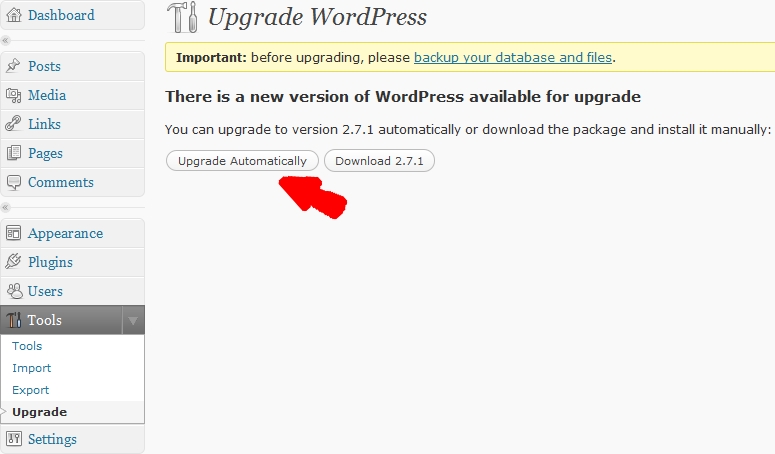
I upgraded to WordPress v2.7.1 as soon as it came out (after testing on another website, of course). I can honestly say WordPress is the only software I use that I actually look forward to upgrading.
Since version 2.7 RC 1, upgrading to the next version of WordPress has been this easy:
How to Upgrade WordPress
You click “Upgrade Automatically” and wait about 5 seconds.
You’re done.
Not entirely off topic: a friend of mine asked me yesterday about the best way to put up a new website. She had thought about using Yahoo Site Builder or some such. Yahoo and its like are great at building free, quick, and ugly websites. If you’re going to publish on the internets, why not just opt for something just as easy and that has hundreds, if not thousands of possible totally free themes to choose from? I say, go with WordPress.
I used to code sites by hand – that’s a chump’s game. Just install WordPress and call it a day.
MicroSoft has no one to blame but themselves for my deleting MicroSoft Office. Well, its partly Dell’s fault too, but that’s a long story I’ll tell some other time. (Short version: Dell repaired a prior laptop and shipped it to a construction site in Oakland.)
OpenOffice.org released version 3.0 of their program on October 13, 2008. It was so wildly popular that their website was crushed under the overwhelming demand. The three most important things to know about OpenOffice are:
Its open source, so its completely free. So, there’s no reason not to give it a shot.
It can open, edit, and save to any MS Office 2000, 2003, 2007, and WordPerfect formats.
It can print or export any file to a PDF.
If you’re a Workers’ Compensation professional in California, you’re probably dealing with EAMS. Since filing things with EAMS means working with a lot of PDF’s. In order to keep from reinventing the wheel, it makes sense to save those PDF’s of the document cover sheets. But what if you need to make a small change later on? Well, OpenOffice v3.0 can help with that too.
Using an extension((basically a small program)) OpenOffice can open and edit and re-save a PDF file. Not even Adobe, the company that promotes the PDF format1 , does a good job of opening and editing PDF’s.
This is a really big deal to me because editing saved PDF’s is going to save me a lot of time editing settlement documents and various pleadings.
Update
I wrote the above about a month ago while I gave OpenOffice 3.0 a shot. It won’t install on my Vista laptop but works great on my XP desktop. I’ve reverted to OpenOffice 2.4 on the laptop while I wait for a fix. OpenOffice 2.4 is still free, but it won’t open MS Office 2007 formats (which not everyone is using anyhow) and cannot edit PDFs.
I’ve been upgrading to the latest releases of WordPress as soon as each one comes out. And, its a good thing too.
Over the last week or two a website named “Wordpresz.org” ((I’ve edited the link so that it goes to WordPress.org instead. I don’t want contribute to these hackers fooling anyone else.)) was discovered. The people who created this website were using a vulenerability in WordPress version 2.6.2 to redirect users to their website. Their website purported to release WordPress version 2.6.41. The problem was that they had hacked one file in the installation package to create a bigger security vulerability.
This just goes to show that:
Monitor for Updates. Many programs these days automatically check to see if new versions are available. If the program does not have this feature2 , its a good idea to check about once a month or so.
Update Frequently. Not all software updates are equal. If the program is being updated to fix security vulnerabilities or improve the program’s stability, you definitely want to install the update. This website’s installation of WordPress was already “inocculated” against this kind of attack because I had alled version 2.6.3 almost as soon as it came out.
Use Official Sources. WordPress is open source software built using PHP and MySQL. Since the program is open source, its easier to modify the code. ((As Uncle Ben said, “With great power comes great responsibility.”)) The themes and plugins available through WordPress.org are reviewed by other users for malicious code and for possible improvements. If you’re not certain how to examine source code for malicious code, its best to only use official sources.
The latest version is 2.6.3 which is just version 2.6.2 with a small but important security fix. [↩]
or those of you keeping score at home, I’ve updated to WordPress v2.6.3 last night. 1 This version was released as a security fix. Unlike other WordPress upgrades, this one took only a few seconds.
Less Quick Updates
Admittedly, prior updates probably only take about 10 minutes, max. This 10 minutes includes roughly 9 minutes of backing the website and database up and 1 minute of actually uploading the new version. Since the 9 minutes of backing up is essentially all processing/downloading time, there’s nothing for me to monitor which makes the whole process very painless.
(If you just can’t wait, skip down two paragraphs.) Regular readers have heard me go on and on about the virtues of WordPress. 3 The interesting thing about new versions of WordPress is that any upgrades would be seamless to a website visitor. 4
A website that is easy to read is a function of the author
Website content is really all that matters to a website visitor. Visitors don’t care about what software a website owner is using – just as long as the content is useful. 5
A website that is easy to write is a function of the program
The single best thing about WordPress is that this program makes maintaining a website a breeze. I would recommend WordPress to absolutely anyone interested in creating a website. For the novice, the program makes it easy to write, edit, and delete single pages or the entire website without any knowledge of programming. For the tech-minded, the program makes it easy to install, upgrade, and personalize a website.
If you know a little PHP, MySQL, and javascript you could do some c-r-a-z-y things with WordPress. 678