Since updating this website to WordPress v2.8 in the middle of June they’ve released two additional security updates. Unfortunately, the latest update also required a little extra tinkering and work on my part. I look on constant security fixes for this fantastic (free!) open source software as a small price to pay for increased security.
Again, the calculators should all be completely impervious to changes in the WordPress program itself. However, its theoretically possible you might notice a little weirdness in how the website looks/acts. If so, please drop me a line and let me know so I can take a look.
We now return you to your regularly scheduled rating…
Wrote a new plugin to handle the disclaimers on guest articles
Added several features to the plugin that displays the related posts
Edited the theme for this website
Added a little search engine optimization magic to the site
Added to and edited the “About” page
Put together a database of the various WCAB district offices so that I can continue my series of posts providing photos, contact information, and driving directions to each office
Last night I updated this website to use WordPress v2.8. There’s a lot of new features under the hood. One that I really like is the ability to browse new website themes.
The calculators should all be completely impervious to changes in WordPress. However, its theoretically possible you might notice a little bit of weirdness in how the rest of the website looks/acts. If so, please drop me a line and let me know so I can look into it.
Late last week a user asked for a new feature.1 He wanted to be able to perform the Ogilvie DFEC rebuttal calculation and have the results e-mailed to him.2 Well, I built it!3
To e-mail yourself a calculation, perform the calculation as normal. When the website returns your calculation, it will say “E-mail Me!” Just click that button and it will send an e-mail to the address you used to register for this website.
However, here’s the cool part: I’ve installed this new e-mail system into every calculator! 4 No more having to copy and paste! Just click one button and your calculation will show up in your inbox!5
Although I intend this to be a paid-subscription-only feature, I am going to leave it open for all users while I get some feedback. So, what do you think? Please leave a comment or shoot me an e-mail!
Why, what did you do with your Saturday morning? [↩]
I haven’t installed it in some of the EAMS lookup functions [↩]
If you filled in the boxes for Applicant, WCAB #, and File #, it will include this information in your e-mail as well. This is only for your convenience and not a requirement. [↩]
A friend of mine owns and operates a number of websites – all of which run on ASP/.NET/MS-SQL servers. He knows what he’s talking about, but he’s fairly dismissive of WordPress, PHP, and MySQL.
All this time I’ve been raving about WordPress, telling him that you can basically do anything with it. I’ve mentioned how easy it is to use, how easy it is to maintain, its open source, how many global corporations use WordPress to build their websites, how its the tool of choice for so many designers, and how huge the WordPress community is.
In the meantime, he’s referring to his millions of rows in his “real-SQL, MicroSoft SQL” database. I believe he’s been stuck thinking of PHP and MySQL as “kiddie” stuff, just not ready for big time.
That is, he’s been dismissive of WordPress until about two months ago. In the last two months other people (SEO consultants, professional designers) have been raving about WordPress to him too.
I often refer to myself as a Workers’ Compensation nerd. The other day I realized that would be a GREAT website name! Unfortunately, WCNerd.com is already taken by “white collar nerd.” Bummer, no? What a great e-mail address that would have been, too!
With well over a 100 posts and counting I thought it was time to include a “tag cloud.” Its on the bottom of the right sidebar of this website. Its basically a grouping of the common words I use to tag various posts. The more common a word is the larger it appears. The top contenders are pretty telling
To help with the website navigation and use of the “tag cloud” I’ve started being more liberal with how I tag my various posts. Its actually kinda fun.
I’m using a new e-mail contact form. I was using “Contact Form 7,” which has a truly impressive feature list. While effective, I didn’t much care for this plugin because of its complexity. What I really wanted was a quick and easy way for website visitors to send me e-mail. Recently I found “Tiny Contact Form” by Tom Braider to be exactly what I needed. It is small, simple to configure, and easy to include. I’m actually using a modified version of the really fantastic “Tiny Contact Form” plugin. I’m rather proud of my modification on this plugin and even sent Tom Braider my changes which he ended up incorporating into the next version!
Google recently swallowed up Feedburner. I was using Feedburner to manage the RSS feeds for this website. The only problem was that it was causing all kinds of problems. My RSS reader wasn’t picking up the new posts from my own blog! So, I scrapped the Feedburner management of my RSS feed and went back to the native WordPress support for RSS (which is pretty damn good).
I upgraded to WordPress v2.7.1 as soon as it came out (after testing on another website, of course). I can honestly say WordPress is the only software I use that I actually look forward to upgrading.
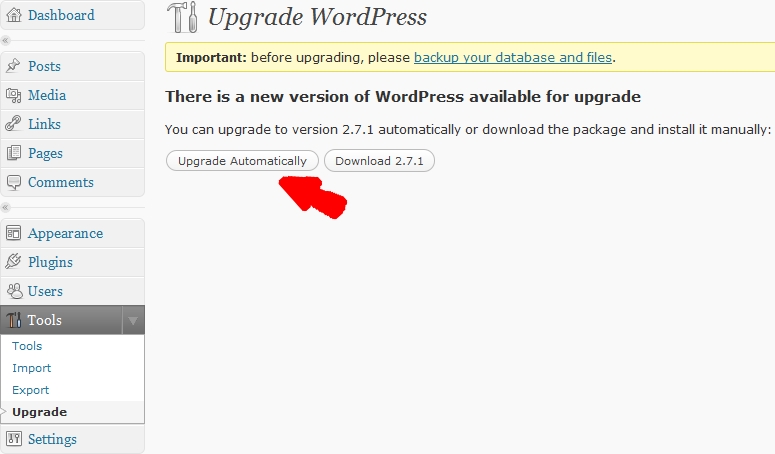
Since version 2.7 RC 1, upgrading to the next version of WordPress has been this easy:
How to Upgrade WordPress
You click “Upgrade Automatically” and wait about 5 seconds.
You’re done.
Not entirely off topic: a friend of mine asked me yesterday about the best way to put up a new website. She had thought about using Yahoo Site Builder or some such. Yahoo and its like are great at building free, quick, and ugly websites. If you’re going to publish on the internets, why not just opt for something just as easy and that has hundreds, if not thousands of possible totally free themes to choose from? I say, go with WordPress.
I used to code sites by hand – that’s a chump’s game. Just install WordPress and call it a day.
I’ve been upgrading to the latest releases of WordPress as soon as each one comes out. And, its a good thing too.
Over the last week or two a website named “Wordpresz.org” ((I’ve edited the link so that it goes to WordPress.org instead. I don’t want contribute to these hackers fooling anyone else.)) was discovered. The people who created this website were using a vulenerability in WordPress version 2.6.2 to redirect users to their website. Their website purported to release WordPress version 2.6.41. The problem was that they had hacked one file in the installation package to create a bigger security vulerability.
This just goes to show that:
Monitor for Updates. Many programs these days automatically check to see if new versions are available. If the program does not have this feature2 , its a good idea to check about once a month or so.
Update Frequently. Not all software updates are equal. If the program is being updated to fix security vulnerabilities or improve the program’s stability, you definitely want to install the update. This website’s installation of WordPress was already “inocculated” against this kind of attack because I had alled version 2.6.3 almost as soon as it came out.
Use Official Sources. WordPress is open source software built using PHP and MySQL. Since the program is open source, its easier to modify the code. ((As Uncle Ben said, “With great power comes great responsibility.”)) The themes and plugins available through WordPress.org are reviewed by other users for malicious code and for possible improvements. If you’re not certain how to examine source code for malicious code, its best to only use official sources.
The latest version is 2.6.3 which is just version 2.6.2 with a small but important security fix. [↩]
or those of you keeping score at home, I’ve updated to WordPress v2.6.3 last night. 1 This version was released as a security fix. Unlike other WordPress upgrades, this one took only a few seconds.
Less Quick Updates
Admittedly, prior updates probably only take about 10 minutes, max. This 10 minutes includes roughly 9 minutes of backing the website and database up and 1 minute of actually uploading the new version. Since the 9 minutes of backing up is essentially all processing/downloading time, there’s nothing for me to monitor which makes the whole process very painless.
(If you just can’t wait, skip down two paragraphs.) Regular readers have heard me go on and on about the virtues of WordPress. 3 The interesting thing about new versions of WordPress is that any upgrades would be seamless to a website visitor. 4
A website that is easy to read is a function of the author
Website content is really all that matters to a website visitor. Visitors don’t care about what software a website owner is using – just as long as the content is useful. 5
A website that is easy to write is a function of the program
The single best thing about WordPress is that this program makes maintaining a website a breeze. I would recommend WordPress to absolutely anyone interested in creating a website. For the novice, the program makes it easy to write, edit, and delete single pages or the entire website without any knowledge of programming. For the tech-minded, the program makes it easy to install, upgrade, and personalize a website.
If you know a little PHP, MySQL, and javascript you could do some c-r-a-z-y things with WordPress. 678
Changing the website’s theme has involved a few small tweaks2 :
For about four days the Articles section was merged with the Blog section. This has been fixed.
I’ve found a really great plugin that allows me to insert footnotes into blog posts.3 My previous attempts at inserting footnotes manually were either time consuming or incredibly clumsy. 4
I’ve made minor alterations to the current theme – background colors, menu ordering, etc.
Some people were separating their WCAB “legacy” number to ADJ number searches by semi-colons, rather than commas. I believe there’s really no sense in fighting users. 5 If a slightly different method makes sense to users, go with it. I’ve adjusted the WCAB “legacy” number to ADJ number search function so that you can separate by semi-colons or commas.6
In printing out some Average Weekly Wage calculations, I discovered to my dismay that this website looked terrible when you tried to print it out. Worse yet, the website header, sidebar, and other navigation information took up nearly a page. This meant that a printout of a calculation might span two or more pages. I’ve since fixed this using some particularly cool CSS.7