WorkersCompensationInfo.com posted a great update on the proposed EAMS regulations. The Board website shows the new proposed regulations and forms. The comment period closes on August 21, 2008. You can download all of the EAMS Proposed Regulations at once here.

There are new forms for:

  • Compromise and Releases
  • Stipulations with Request for Award
  • Minutes of Hearing
  • Declaration of Readiness to Proceed
  • Disability Evaluation Unit (DEU) forms and regulations
  • Retraining and Return to Work (RRTW) forms and regulations

Those wishing to comment can send their thoughts as follows:

There’s a physical mail address as well – but with EAMS around the corner, shouldn’t you get used to e-mail?

As the man said, “you can’t always get what you want.” Here’s what I need from a cell phone:

  • Multiple numbers per contact
  • Multiple alarms
  • Scheduling events
  • Text messaging
  • Ability to jot down notes
  • A battery with 4 hours of talk time and a few days of standby time

My current phone can do all that. The battery life is failing, reception is spotty, and its been dropped more times than I was as a baby. Here’s what I want out of a new phone:

  1. Contacts and calendar that can synch with my laptop
  2. Bluetooth support and file access (to transfer files wirelessly)
  3. A web browser that works as well as IE7 or FF2 (Namely: proper HTML rendering, CSS rendering, cookies, and javascript support)

I know the LG Dare can handle #1 and #2, but I’m dubious about its support for #3.

I know the iPhone can handle #3 fairly well, but am dubious about its support for #1 and #2.

So, it looks like the only phone thus far that can use these calculators is… the iPhone. Don’t blame me – blame every other cell phone maker out there. I played with an LG Dare again a few days ago and was disappointed with its web browser this time.

I’m sure its a great phone. But, let’s be real, that’s not good enough any more.

Pros:

  • Touch screen
  • Virtual QWERTY keyboard
  • A screen that rotates when you tilt the camera
  • MP3 player
  • Digital camera, video camera
  • Removable memory chip
  • 500 contact with up to 5 phone numbers each
  • A web browser that will support AJAX and XMLHttpRequest
  • Decent support of cascading stylesheets

Cons:

  • Imperfect support of javascript
  • No support of cookies/sessions

What does this mean for you? You can go to my site, but you can’t log in. If you can’t log in, you can’t use the calculators. :/

As a side note, just about every Verizon rep I’ve talked to pushes this phone’s 500 person contact list. My question, “How much memory does the phone have?” Their response: “It has 5 phone numbers per contact? Wow. That’s a lot. I didn’t know that.” Riiight – you didn’t know? Why have I heard that exact line from three separate reps? I don’t have 500 contacts. I don’t even know 500 people.

Verdict: It may be a good phone, but you won’t be able to use my calculators from it.

I recently gave a brief overview of my permanent disability and workers’ compensation benefit calculators. In that post I wrote a little bit about how my website calculators work.

In late 2004 I spent some of my free time working on a calculator for the 1997 Permanent Disability Rating Schedule 100% pure javascript (the only programming language I knew at the time). I had several reasons for never publicly releasing this calculator:

  • Uniformity. Not all computers and browsers perform all javascript functions the same way.
  • Speed. A pure javascript calculator would require the user to download all of the code – not just the parts they needed.
  • Protection. Anyone with a modicum of technical knowledge could simply downloaded the calculators, and then post it as their own.
  • Obsolete. With SB 899 and the 2005 Permanent Disability Rating Schedule, my calculator became nearly obsolete. I scrapped it rather than building a second calculator.

The current workers’ compensation benefits calculators use very very little javascript. Doing so has meant that I don’t have to worry about different computers/browsers, users only need to download the code they need to run a single calculation, and my calculators don’t work without my server.

Next up, PHP!

This jet
This jet

Mostly because its so flipping cool.

I’m one of those kinds of people who likes to customize their things to suit them better. My junky cell phone has a custom ringtone I created, custom welcome/power-on message, my e-mail and word processing programs have tons of little shortcuts to make my life a little easier in a multitude of ways. My dictaphone has a sticker on it.1

The great thing about WordPress is that the entire program is SO customizable. You can change how it looks with “Themes” and how it acts with “Plugins.” I’ve been using it since March or so, even though it wasn’t publicly launched until July. I’m still finding all of these cool little features.

My current favorite feature: The ability to schedule a post. I can draft a quick post and then schedule it to appear on a particular day or time. Brilliant!

Its the little things in life, you know?

  1. A sticker of a jet. [↩]

Here’s a (simplified) overview of how my permanent disability/impairment and workers’ compensation benefits calculators work. As I’ve mentioned elsewhere, I wrote these website calculators using javascript, PHP, MySQL, and AJAX.

In a recent post, I created a really simple test for cell phones using the above languages. Here’s what was happening:

  • The user clicks the button “Cell Test.”
  • The javascript embedded in the button detects the “click.”
  • The javascript embedded in the button then tells an AJAX program that the button was clicked.
  • AJAX sends a little bit of information to the web server – saying that the user clicked that button.
  • The PHP program on the server is notified that the button was clicked.
  • The PHP program checks a MySQL table to see what it should happen when that button is clicked.
  • The MySQL table returns the answer, what should happen when a button is clicked, to the PHP program.
  • The PHP program takes the answer from the MySQL table and sends it back to the AJAX program.
  • The AJAX program takes that information and, using a little bit of javascript, displays the answer in your web browser.

Easy!

Warning! Technobabble! Warning! Permanent brain damage could result! If you’re not into technobabble, please just skip this post.

In order to put up the Articles page, I had to modify the WordPress theme I’m using. The WordPress Themer Kit is a really really great tool for the design-challenged.12

You don’t have to have any special design skill, just the ability to tinker with cascading style sheets.3

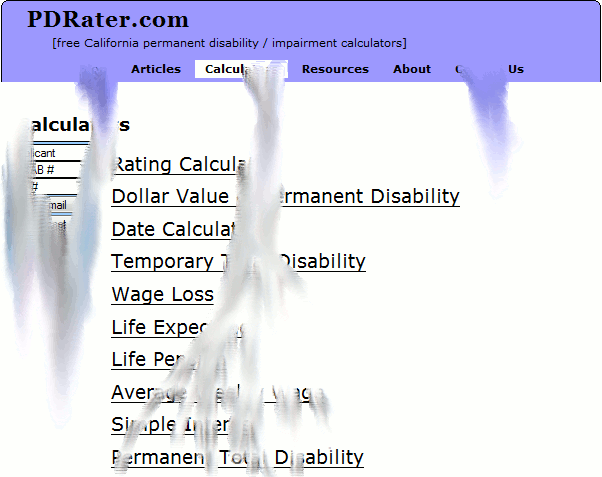
Melty calculators
Melty calculators

Up until now, I’ve tried to keep the theme modifications to a minimum. I’ve done this before – such as to add the nifty little rounded corners to the tops and bottom of each page. One little error and your entire blog looks like alphabet soup or, worse, a Dali painting.

Don’t get me wrong – I like Dali. I just think my calculators would be more difficult to use if they went all melty.
P.S. Don’t leave your website calculators out in the sun.

  1. I think the bald guy is going to win. [↩]
  2. My wife watches the show. Sounds like a lame disclaimer, I know. [↩]
  3. I warned you! Didn’t I warn you about the technobabble!?! [↩]

A friend sent me an e-mail letting me know their Verizon LG 9400 phone works with the calculator test. (Thanks Patty!) According to Verizon’s site this phone is out of stock.

FYI, when I need to research a phone, I use PhoneScoop.com. I find it a handy way to search/compare features. My own phone… has seen better days. I’m thinking the LG Dare, but we’ll see.

If your phone does not already work with PDRater.com, have you tried using a different web browser on your phone? Everyone knows Internet Explorer (sorry, no link :P ), most people know about FireFox (my own browser of choice), but there’s also Opera and OperaMini. OperaMini can be installed on some phones as an alternative to the factor web browser. From playing around with the OperaMini demo page, it looks like OperaMini will work with my calculators.

Almost completely off topic, have you seen the iPhone simulator? Sure, it doesn’t play music or make phone calls, but if you need a fix or want to test out some calculators (ahem), it’s a pretty cool website.1

  1. Do people even use iPhones for telephone calls anymore? That’s sooo analog. . . . [↩]

Thus far, I’ve discovered only two cell phones that can take advantage of my calculators:

I’ve only tested the iPhone with the version of this site launched on September 17, 2007. However, it should still work.

Do you have a cell phone with a web browser? Click here:
If you see a message appear, your phone will probably work with the calculators.

Hopefully I’ll be upgrading this website again in the next few days.

This website was created using the WordPress open source blog software. WordPress is a flexible program for creating websites and blogs. Since this program is “open source“, its source code is open for anyone to review and can be modified by anyone (sufficiently nerdy1 ).

The earliest test versions of the blog-website version of PDRater.com were built using WordPress 2.3. This was superseded by version 2.5 in late March. Version 2.6 was just released. I will be upgrading to the latest version as soon a I get a chance. If all goes well, you’ll never notice a thing.

As a side note, upgrading my installation of WordPress is a lesser priority than redeveloping the calculators.

  1. Such as myself. [↩]