Professor, tell me more of this DFEC rebuttal calculator...

Earlier today I installed an Ogilvie v. City and County of SF DFEC Rebuttal calculator into the free workers’ compensation calculators page on this website. 123 For the moment it is only available to people who have signed up for this website and asked to be a beta tester.  If all goes well, I’ll flip a switch and make it available to the public on Monday morning.

At the moment it requires four pieces of information:

  1. FEC Rank (re: body part in question)
  2. Standard disability (re: body part in question)
  3. Post-injury earnings for Applicant
  4. Post-injury earnings for employees similarly situated to Applicant

Once you add in that information, click “Calculate” and it should crunch through the formula and give you a response.  The WCAB in Ogilvie suggested several possible outcomes to this formula:

  • The “Individualized Loss Ratio” for the injured worker is the same or within the range for the current FEC Rank for the affected body part.  In this circumstance, the 2005 DFEC has not been rebutted.
  • The “Individualized Loss Ratio” for the injured worker is within the range of one of the other seven FEC Ranks.  Here, the DFEC portion of the 2005 Permanent Disability Rating Schedule might be rebutted.
  • The “Individualized Loss Ratio” for the injured worker is outside the range of all eight FEC Ranks.  In this circumstance, you could end up with a new FEC Adjustment Factor much higher or lower than any FEC Adjustment Factor associated with the eight FEC Ranks.  Here, the DFEC portion of the 2005 Permanent Disability Rating Schedule might be rebutted.

Obviously, there are innumerable factors that go into considerations of whether a Judge (or the WCAB) would find the DFEC portion of the 2005 Permanent Disability Rating Schedule to be rebutted.  This calculation and the information relied upon in performing this calculation cannot be taken as a guarranteed method of rebutting the DFEC portion of the 2005 Permanent Disability Rating Schedule.

If you’re not a registered user for this website, its free to sign up and free to use all the workers’ compensation calculators.  That’s right: free as in free.

  1. Photo courtesy of Draggin [↩]
  2. I had this EXACT same calculator as a kid! [↩]
  3. Why, how did you spend your Friday night? [↩]

Need help with a workers compensation calculator?
Need help with a workers' compensation calculator?

I put out the call for help testing my Ogilvie DFEC rebuttal calculator and got a bite! 1 I wrote it two days ago and refined it a little bit last night.2

If anyone else is interested in helping test this Ogilvie DFEC rebuttal calculator, please drop me a line and let me know.

The ideal tester is someone who:

  1. Has read Ogilvie and understands how to do the Ogilvie DFEC rebuttal calculations
  2. Is willing to use the Ogilvie DFEC rebuttal calculator this weekend
  3. Is willing to e-mail me with feedback this weekend so I can launch it on Monday to the public

If you’re not a registered user for this website, its free to sign up and free to use all the workers’ compensation calculators.

You heard me, free as in free.

  1. Photo courtesy of Joy of the Mundane. [↩]
  2. Because I’m a total workers’ compensation nerd. [↩]

Whats the WCAB doing NOW???
What's the WCAB doing NOW???

UPDATE 9/3/2009:  Download the new en banc Ogilvie II and Almaraz/Guzman II decisions here!

Need a FREE sample Ogilvie analysis brief complete with citations?

Some crazy stuff has happened in the last two days.  1 Two big en banc decisions were just handed down from the WCAB. Here they are, hot off the presses and ready for downloading:

Of the two cases, I enjoyed Ogilvie v. City and County of San Francisco much more.  This case describes to what extent the 2005 Permanent Disability Rating Schedule may be rebutted2 and how one might go about doing this.

Pages 22 through 32 are basically nothing but math. 3  These pages detail the information and methodology necessary to rebut the DFEC portion of the 2005 Schedule.

Last night I wrote a prototype calculator which will allow you to determine whether you may or may not be able to rebut the DFEC portion of the 2005 Permanent Disability Rating Schedule.  This calculator would only perform the DFEC rebuttal calculations suggested in the majority opinion, since this is now the law of the land.  My plan is to test it this weekend and launch it Monday.

However, if anyone is interested in helping me test it, I would appreciate the help.  Just drop me a line and I’ll give you the link as soon as its ready.

In the meantime, if you want to crunch the numbers yourself (or follow along with the WCAB in Ogilvie), you will probably find Table A and Table B page 1-7 of the 2005 PDRS to be very helpful.

FYI, there are a lot of “footnotes” in Ogilvie that reference various online documents or websites.  I’ve downloaded a copy or provided a screenshot of each of these pages for your reference:

  1. Photo courtesy of Kyle Kesselring [↩]
  2. Basically just the DFEC portion. [↩]
  3. Yay! [↩]

Road Warrior
Road Warrior

I used to really dislike driving long distances.  However, in the last few months I’ve done a few things to completely change my mind.

  1. Use a GPS. I no longer have to worry about leaving directions at home, taking a wrong turn, finding food or fuel, or needing a detour.  I just hop in the car, hit the road, head in the general direction of my destination, and plug in the address on the way.
  2. Buy prescription sunglasses. Sunglasses have made a world of difference.  Yesterday I drove out to Auburn in the morning and back to the East Bay in the afternoon, driving into the sun both ways.  Having the sunglasses has completely eliminated squinting and strain on my eyes.
  3. Take Music. Loading up the GPS with music has really helped pass the time.  I even added a few hours of MCLE, just in case!
  4. Drive slower. I’ve made a point of obeying the speed limit, even when I’m running late.  Driving fast saves a negligible amount of time and can be very stressful.

These four things have transformed my long drives from stressful events into fairly enjoyable trips.

Glasses, online
Glasses, online

As I mentioned about two weeks ago, I had ordered some glasses online through two different retailers.  1 At an average of $20.00 a pair, it was hard not to get carried away.

One pair of glasses had “polychromatic” lenses and cost about $35.00.  The other three pairs included a regular pair of glasses, a pair of tinted glasses for use as sunglasses, and a funky pair since they were totally free free (complete with frames and prescription lenses!?!?!)

I ordered from two different retailers because (1) $35.00 for those “transition” lenses aka “polychromatic” lenses was too good to pass up and (2) so I could compare the customer service and quality of the two companies.

Service through one company was a little better than the other.  However, I’m not qualified to judge quality.  Although I’m very happy with the look of these frames and lenses, I’d feel a lot better if I took them to my optomologist to be sure.

That said, I’m going to postpone an in-depth review until I see my eye-doc.  When I post the review I’ll include a few tips for ordering glasses online.2

  1. Photo courtesy of Morningstar Lee [↩]
  2. You know, from my vast experience. [↩]

Multiple Disabilities Table
Multiple Disabilities Table, easy, no?

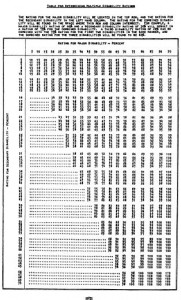
Right after “workers’ compensation calculator” and “permanent disability calculator,” the top search term for people coming to this website is “multiple disabilities table.”

If you want to combine multiple disabilities for injuries before 2005,1 you can:

  1. After 2005, you may need to use the Combined Values Chart from the 2005 PDRS. [↩]
  2. FYI: The multiple disabilities chart in the rating schedules gives you disability increments of 5% points. [↩]
  3. The chart on the right is from the 1988 PDRS [↩]

Glasses, online
Glasses, online

I’ve already said I’m a big fan of NPR.  A few weeks ago they ran a story about the “Best-Kept Online Secret: Cheap Eyeglasses.”  The author, tired of paying hundreds of dollars for glasses, tried out a few different online glasses retailers. 1

This weekend I ordered glasses from two different websites. (I’m going to hold off mentioning which ones for now.  I’ll wait to find out what kind of a job they do.)

I ordered four pairs of glasses for much less than what a single pair used to cost me.  If all goes well, I’ll be getting one pair of sunglasses, one pair of color changing glasses, one pair that looks almost identical to the ones I wear now, and one pair of funky glasses (this was the free one).

The trade-off is that the glasses will take about two weeks.

See you in two weeks!2

  1. Photo courtesy of Morningstar Lee [↩]
  2. Ha ha! [↩]

Dell
Dell Customer Service!!!

Dell’s customer service has been my single greatest customer service experience with any product, ever.

Let me break it down for you:

Here’s Lionel’s e-mail to me from just after midnight this morning:

“Jay:Lionel Menchaca, Chief Dell Blogger

That’s great news. I’m really glad to see it all worked out smoothly. I appreciate you being a loyal Dell customer. Feel free to tell any other Dell customers how to contact me directly if they need some assistance.

It’s customer’s like you that make this the best job I’ve ever had.

Sincerely,

Lionel Menchaca

Chief Blogger, Dell Inc.

www.dell.com/blogs

e-mail: lionel_menchaca@dell.com

Twitter: twitter.com/LionelatDell

phone: 512.728.8685″

If you’ve got an issue with your Dell, get a hold of Lionel directly.  He’s an incredible guy working for an incredible company.  Lionel and Dell took care of me.  This Dell XPS m1210 is my third Dell laptop, and my next computer will absolutely be a Dell too.

  1. It died within 1 year after my warranty expired, but by the time I talked to Dell it was more than a year out of warranty. [↩]
  2. It was a very simple and short e-mail, so it took me forever to write. [↩]
  3. The only way to fix a bad integrated graphics card. [↩]
  4. “Rock on completely, with some brand new components!” – CAKE [↩]

Dell
Dell Customer Service?

I think Dell just made me a customer for life.

I’ve already spent nearly $200 repairing my laptop. After three total repairs1, my laptop finally died – again.

Since I had nothing to lose, I sent an e-mail to Dell’s head blogger, Lionel Menchaca about my problem. He was lightning fast in responding to me – asking for my Dell service tag.2

When Dell had lost my prior laptop and replaced it with the XPS m1210 I purchased a warranty extension. I had spent a fair bit of change on that laptop and I was expecting to keep it around a while. However, that extended warranty lapsed a little over a year ago.3 I explained my problem with the bad nVidia video card. He responded telling me that I would be getting a call from someone soon.

Sure enough, less than a day later I received a call from Dell’s corporate customer service program. They told me that as a “gesture of good will” they were going to replace my computer’s motherboard – by sending a technician to me to do the repair.

Replacing a motherboard is so expensive its almost always cheaper to buy a new computer. Offering to repair an out-of-warranty laptop by sending a tech to me to replace the motherboard???

All I can say is WOW.

  1. Two of which were under Paramount Technology’s repair warranty. [↩]
  2. This is a number on a little sticker underneath the laptop. The service tag code is essentially a serial number they use to track your computer when its being repaired or you call for technical support. [↩]
  3. Although, less than a year from when I first started having this problem [↩]

New Laptop
New Laptop

Yesterday I discussed the basics of buying a new computer.  The most important first step is figuring out what you need and what you want out of a new computer.  There are three main types of portable computers available these days: netbooks, basic laptops, and high-end laptops.  Today is all about “netbooks.”1

(Scroll to the end to see my picks…)

Netbooks

A netbook is a very small laptop designed to extremely mobile and portable.  They are optimized for portability and wireless connectivity.

Netbooks typically have a display of 10″ or less. 2 They usually don’t have any CD or DVD drives. 3  They usually have very small solid state drives or mid-sized hard drives.  On the plus side, they usually have bluetooth, media card readers, and WiFi.  They’re typically between 2 to 3 pounds, depending upon brand and type of battery.  They’re also relatively cheap – between $350 to $500.

My requirements may differ from yours.  If I were to buy a netbook, I would want:

  • Minimum 2 USB ports, preferably 3
  • Minimum 100 GB hard drive
  • 1 GB RAM
  • Bluetooth
  • WiFi aka 802.11a/b/g, and preferably also 802.11n
  • Ethernet port
  • Modem port

Other things people might care about (but I don’t):

  • Webcam
  • Keyboard size
  • Monitor size

Keep in mind, I’ve never used any of these laptops – I’m just evaluating them based on their prices and my own opinions as to their respective brands and specs.  Although, I’m enough of a nerd that I put together a spreadsheet to compare those five netbooks as well as about another dozen or so models and submodels.  If anyone is interested in seeing the spreadsheet, mention it in the comments below or drop me a line.

Dell has a new netbook too, but it only has solid state drive options – which are too small to be of use to me. 4 However, I’m sure it would be perfect for some people.

My picks are, in rough order of preference:

If I were to buy a netbook today, I’d probably go for the Acer Aspire One.  It occupies a sweet spot in terms of price, is a decent brand, and has very comparable specs to the higher-end models.

Next, basic laptops!

  1. Photo courtesy of Ciccio Pizzettaro [↩]
  2. TV’s and monitors are always measured by the diagonal. [↩]
  3. This means they’re no good for watching DVD’s or playing CD’s. [↩]
  4. 8 GB of hard drive space is barely enough to run an operating system and a few programs these days… [↩]