
1997 PDRS

Pocket Calculators

I was at the San Jose WCAB on Friday. Since recently discovering that I could run this website’s permanent disability rating calculators from my phone’s web browser, this was the first time I left my rating manual, money chart, and date wheel in the car.1
It was great. That morning I used my phone to:
- Find the ADJ number associated with the legacy SJO number on my file
- Calculate an Ogilvie adjustment of a rating string
- Calculate the number days between two dates
- Perform old and new schedule ratings
- Perform a CVC (combined values chart) calculation2
The benefit for me is not so much that I don’t have to carry the rating manuals, dollar value charts, and date wheels. Unlike these tools, my phone is not something I’m going to misplace or loan and never see again.
The best part is that if I want to refer back to the calculation I just performed, I can just e-mail it to myself!
PDRater.com calculators for your phone!

I recently discovered that installing the Opera Mini web browser on my “smartphone” has allowed me to run this website’s workers’ compensation calculators from my phone.1
Since launching this website I’ve given a lot of thought to support for cell phones. There just are not many phones that can run these calculators.2 The glaring and notable exception is the iPhone.
Amusingly, one of this website’s users has asked for an “iPhone app” version of this site. Seriously, you’ve got one of the few phones that can use this site and that’s not good enough for you? (Thanks Chris!)
This is huge. It means:
- I can blog from the Board3
- More importantly, no more bulky money charts or rating manuals at the Board!
Ogilvie, Almaraz, & Guzman: Reconsideration Granted! Amicus Briefs Allowed!

Sometimes even the WCAB needs more time to think.1
On March 26, 2009, the director of the Department of Industrial Relations, John C. Duncan, issued a letter to the entire Workers’ Compensation Appeals Board asking them to vacate their own decisions and solicit argument and amicus briefs. Here’s a copy, courtesy of WCExec.com, the Letter from Director of DIR to WCAB re: Ogilvie and Almaraz/Guzman (3/26/2009).
On Monday April 6, 2009 the WCAB issued three Orders Granting Reconsideration and Order Allowing Amicus Briefs (en banc) in Ogilvie and Almaraz/Guzman. For your review:
- Order Granting Reconsideration and Order Allowing Amicus Briefs on Wanda Ogilvie v. City and County of San Francisco, ADJ1177048, SFO 0487779, (en banc) (4/6/2009)
- Order Granting Reconsideration and Order Allowing Amicus Briefs on Mario Almaraz v. Environmental Recovery Services (a.k.a. ENVIROSERVE) and State Compensation Insurance Fund, ADJ1078163, BAK 0145426 (en banc) (4/6/2009) and Joyce Guzman v. Milpitas Unified School District and Keenan & Associates, ADJ3341185, SJO 0254688 (en banc) (4/6/2009)
What does the Order Granting Reconsideration of Ogilvie and Almaraz/Guzman mean for you?
- Ogilvie and Almaraz/Guzman are still the law. Despite Commissioner Aghazarian’s two concurring opinions, the WCAB did not issue a stay of either Ogilvie or Almaraz/Guzman.
- The WCAB has granted SCIF’s petition for reconsideration in Almaraz, granting reconsideration on their own motion in Guzman, and the parties’ petitions for reconsideration in Ogilvie. They have granted reconsideration on these cases to, “afford us a sufficient opporutnity to study the issues.”2
- Any interested party may file an amicus brief no later than May 1, 2009 at 5pm.
- Photo courtesy of radiospike photography [↩]
- Hence, the “The Thinker” reference above… [↩]
New Ogilvie DFEC Rebuttal Calculator feature!

Late last week a user asked for a new feature.1 He wanted to be able to perform the Ogilvie DFEC rebuttal calculation and have the results e-mailed to him.2 Well, I built it!3
To e-mail yourself a calculation, perform the calculation as normal. When the website returns your calculation, it will say “E-mail Me!” Just click that button and it will send an e-mail to the address you used to register for this website.
However, here’s the cool part: I’ve installed this new e-mail system into every calculator! 4 No more having to copy and paste! Just click one button and your calculation will show up in your inbox!5
Although I intend this to be a paid-subscription-only feature, I am going to leave it open for all users while I get some feedback. So, what do you think? Please leave a comment or shoot me an e-mail!
- Thanks Dennis! [↩]
- Photo courtesy of Vernhart [↩]
- Why, what did you do with your Saturday morning? [↩]
- I haven’t installed it in some of the EAMS lookup functions [↩]
- If you filled in the boxes for Applicant, WCAB #, and File #, it will include this information in your e-mail as well. This is only for your convenience and not a requirement. [↩]
Ogilvie v. City and County of SF DFEC Rebuttal Calculator

I put out the call for help testing my Ogilvie DFEC rebuttal calculator and got a bite! 1 I wrote it two days ago and refined it a little bit last night.2
If anyone else is interested in helping test this Ogilvie DFEC rebuttal calculator, please drop me a line and let me know.
The ideal tester is someone who:
- Has read Ogilvie and understands how to do the Ogilvie DFEC rebuttal calculations
- Is willing to use the Ogilvie DFEC rebuttal calculator this weekend
- Is willing to e-mail me with feedback this weekend so I can launch it on Monday to the public
If you’re not a registered user for this website, its free to sign up and free to use all the workers’ compensation calculators.
You heard me, free as in free.
- Photo courtesy of Joy of the Mundane. [↩]
- Because I’m a total workers’ compensation nerd. [↩]
Multiple Disabilities Table Calculator
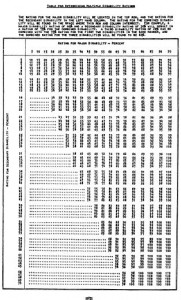
Right after “workers’ compensation calculator” and “permanent disability calculator,” the top search term for people coming to this website is “multiple disabilities table.”
If you want to combine multiple disabilities for injuries before 2005,1 you can:
- Use the six step formula in the 1997 PDRS on page 7-12.
- Use the two page chart in the 1997 PDRS on pages 7-15 to 7-1623
- Take 30 seconds to register for this website for free and use the multiple disabilities calculators whenever you want!
- After 2005, you may need to use the Combined Values Chart from the 2005 PDRS. [↩]
- FYI: The multiple disabilities chart in the rating schedules gives you disability increments of 5% points. [↩]
- The chart on the right is from the 1988 PDRS [↩]
Two More Calculator Features!

Last week, at the request of a paid subscriber, I added a new permanent disability rating calculator feature.1 2 Prior users had asked about incorporating an automatic dollar value of permanent disability or “money chart” For the reasons I described in that prior post, I just couldn’t think of a good way to incorporate an automatic calculation of the monetary value of permenant disability.
New Paid Subscriber Feature

Once I added this feature, I realized there were at least two more instances when an automatic calculation of dollar value of permanent disability might come in very handy: when calculating the Multiple Disabilities Table3 or Combined Value Chart4 values from combining one or more permanent disability ratings.
Now, when a paid subscriber calculates the CVC or MDT of multiple ratings, the calculated combined rating is fed to the dollar value of permanent disability calculator and the dollar value calculated.
New Calculator Features!

Last Friday I announced some “website tweaks.” Since then a paid subscriber1 reiterated a feature request.2 As a paid subscriber, he is able to calculate an unlimited number of ratings so that they all show up on a single page. Basically, he wanted to be able to see the dollar value for a particular permanent partial disability percentage at the same time as a rating.
This isn’t the first time I’ve wrestled with the problems in creating such a feature. There are several problems with incorporating this feature into the calculator’s page.
- The rating calculator and the dollar value of permanent disability calculators cannot be open at the same time.
- The rating calculator does not require the date of injury, just the age of the injured worker. Without the date of injury, the website cannot properly display the dollar value of a permanent partial disability percentage.
- When a paid subscriber has performed more than one rating calculation on a page, the website cannot decide which rating string to convert into the equivalent number of dollars.
This exact feature had been suggested by other users in the past.3 My original thinking was that trying to accommodate this feature request would involve too many unknown variables. After giving the matter some more thought, here’s what I’ve come up with:
- Paid subscribers benefit from improved print formatting. Basically, I’ve created a special file that changes the way the calculator page looks when a paid subscriber is printing. 4 Paid subscribers benefit from having the calculator page streamlined specifically for printing.
- Paid subscribers can have more than one calculator open at a time. This one feature probably addresses 90% of this user’s concerns. If you’re able to keep both calculators open at the same time, it should be easy to perform a rating and then turn the percentage into a dollar value.
- Paid subscribers receive automatic calculations of dollar value of ratings. When a paid subscriber performs a rating calculation, the “Dollar Value of Permanent Disability” calculator automatically opens and the dollar value of the rating is automatically calculated. The user will still have to adjust calculation to account for the year of the injury. However, this is probably the most elegant solution to this issue.
- As opposed to a free subscriber [↩]
- Thanks Marc! [↩]
- And even some competitors!!! [↩]
- The special file is actually just some CSS to optimize page for printing. [↩]
Road Warrior Checklist – Appearances

Appearances, whether for a hearing or deposition, require additional equipment, preparation, and forethought. Here’s what I carry with me when I’m scheduled to appear.
- Cell phone
- Phone numbers for the office, destination, and client programmed in the day before.
- Photocopier code programmed into the phone.
- Includes calculator.1
- Alarm. When parking at a meter, set the phone’s alarm for 5 minutes before time expires.
- GPS
- Address and phone number of destination programmed in the day before.
- Money
- $5 is the bare minimum, in case I need to be across a bridge on short notice.
- Quarters for parking.
- Bills for photocopies.
- Copy cards.
- Every time I use a copy card, I write the date and amount remaining on it in permanent ink.
- BART tickets
- I consider $5 a minimum, in case I need to be in S.F. on short notice.
- Dictaphone
- Extra batteries.
- Leather bound folder
- Legal pad
- PD chart
- Mini-rating manual for 1997 and 20052
- Settlement documents.
- You never know when a case might unexpectedly settle.
- Record release forms.
- You never know when a settlement might fall through.
- Backpack
Previous “Road Warrior Checklists”: