Please don't sue us!

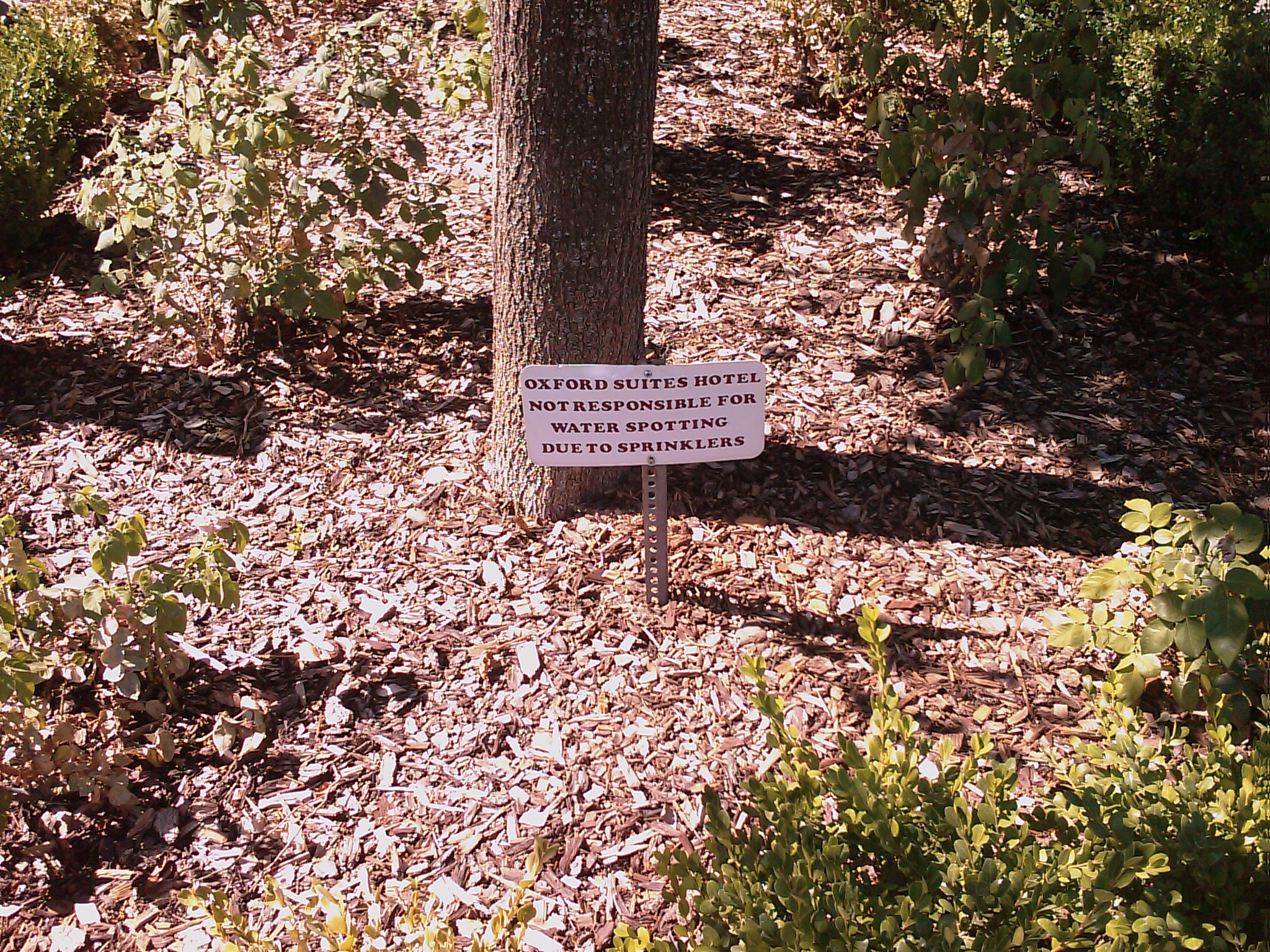
This last weekend I stayed overnight at a hotel in Chico.  In the planters next to the parking lot they had placed these disclaimers/warning labels that read, “OXFORD SUITE HOTEL NOT RESPONSIBLE FOR WATER SPOTTING DUE TO SPRINKLERS.”1

This brought to mind any number of responses:

  • “Oxford Suite Hotel not responsible for water”
  • “Oxfor Suite Hotel not responsible for H2O on your H2”
  • “Oxford Suite Hotel:  You failed physics in high school, didn’t you?”
  • “Oxford Suite Hotel:  Newton and Einstein – what bastards!”
  • “Oxford Suite Hotel:  Life’s tough.  Buy a helmet.”
  • “Oxford Suite Hotel not responsible for the administration of midnight beating for people who complain about water spotting due to sprinklers.  You brought that on yourself.”

I’m sure some idiot called their management to complain about how the sprinklers had left spots on their car.  When you think about it, Oxford Suite Hotel should be responsible for the installation, functioning, and maintenance of their own sprinklers, just as people who own vehicles should be responsible for the care and maintenance of their own vehicles.

There’s no making some people happy.  If they are going to complain about thier vehicle getting wet, while it’s outside, they’re going to complain about the lighting, the room, the service, the sheets, the ice being too cold, the A.C. being too loud, and the TV being too dry.

Here’s a decent business model: sprinklers automatically spray a customer’s car as soon as they pull up.  If they moan about spotting, send them on their way.  If they thank you for washing their car, offer them a complimentary breakfast with their stay.

In any case, I blame the huge evil sign industry that has purchased our elected officials.

  1. Sign, parking lot, shrubbery, and wood chips are the sole responsibility of Oxford Suite Hotel – no matter what disclaimers they put up.  Photo by Jay Shergill, all rights reserved. []

...and she was reading this!

Yesterday morning I was driving to the San Jose Workers’ Compensation Appeals Board along 680 in the midst of some pretty gnarly traffic.  A woman followed me in her black Infiniti from roughly Danville to Dublin, tailgating.1

She was following me so closely, I could literally read her lips as she was chanting, “Oh my god, oh my god, oh my god.”

I kid you not.

  1. Photo courtesy of BillyPalooza []

Always room for guest articles at PDRater!

Emily Tincher has recently provided a vocational expert’s perspective on the Ogilvie and Almaraz/Guzman decisions.

Have you got an article on workers’ compensation you’d like to see published?  Drop me a line and let me know.1

Thanks Emily!

P.S. For those of who keeping score at home, this is my 200th post!!!  That’s 200 posts in 357 days or roughly a post every 1.7 days.

  1. Photo courtesy of Stephen Cummings []

goodmorningohmanishouldreallywritesomenewstuffforthiswebsite!!!

Some days I’m inspired to develop new things for this website.  Here’s a few things I did this morning:1

  • Added a guest article
  • Wrote a new plugin to handle the disclaimers on guest articles
  • Added several features to the plugin that displays the related posts
  • Edited the theme for this website
  • Added a little search engine optimization magic to the site
  • Added to and edited the “About” page
  • Put together a database of the various WCAB district offices so that I can continue my series of posts providing photos, contact information, and driving directions to each office
  1. Photo courtesy of lepiaf.geo []

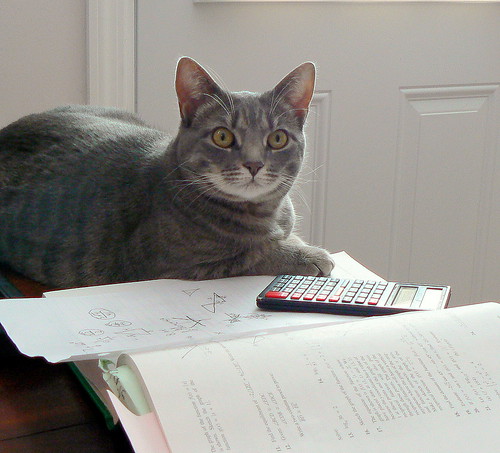
PDRater workers compensation calculators - so easy a cat can use them!
PDRater workers' compensation calculators - so easy your cat can use them!

What’s that?  You haven’t memorized ALL of the FEC ranks to go with each of the 2005 Permanent Disability Rating Schedule body parts? 1

Why didn’t you say so?   (Actually, someone did ask for an easy way to look up the FEC ranks back on April 1).

I’ve been working on an easy way to allow a user to look up and quickly insert the FEC rank for the affected body part.  I finally got around to building it a few days ago and launched it this morning.  Please give it a shot and let me know what you think.

Here’s all you need to do to perform your very own Ogilvie calculation:

  1. Go to the permanent disability calculator page. (If you haven’t already signed up for free, this is a good time.)
  2. Click “Ogilvie” Diminished Future Earning Capacity Calculator
  3. Type in the FEC rank OR click “FEC Rank (1-8)” and click on the injured body part.  It will look up the FEC rank and insert it for you.
  4. Type in the “Whole Person Impairment”
  5. Type in the “Post Injury Earnings of Applicant”
  6. Type in the “Post Injury Earnings of Similarly Situated Employees” OR click the link to obtain some information from the EDD Labor Market Information Division (LMID) and US Department of Labor, Bureau of Labor Statistics (BLS).

If you can think of a way for me to make this calculator even easier, please let me know2

  1. You’ve only had four years, right? []
  2. Photo courtesy of Vicki’s Pics []

How to stretch your law offices budget
How to stretch your law office's budget

Cost: $0.00

Savings: $150/computer

Here’s an easy way to save your law practice several hundred dollars in the next few months.  The next time you have to purchase a new computer do not buy a copy of MicroSoft Office, MicroSoft Word, or WordPerfect.  Even basic versions of these programs can run several hundred dollars per computer.1  You don’t have to purchase these programs!

Try OpenOffice instead!  I have been using OpenOffice on my home and work computers for the last three years and have been extremely happy with it.  I have given copies of this program to family, friends, and colleagues who are also all very happy with it.  I’ve used it for simple correspondence, legal pleadings, spreadsheets, and presentations.

Here are a few “real world” benefits:

OpenOffice is totally 100% free open source software

Free as in free.  Give it to your friends.  Install it at home and on your kids’ computers.  Don’t worry about software piracy.  Its totally, completely, free.

OpenOffice has better document recovery

Its important to know that OpenOffice is much more stable than anything MicroSoft or WordPerfect has to offer.  It is extremely rare that OpenOffice crashes on me.  If you’re using MicroSoft Word and you haven’t saved your document at least once, a single crash will completely erase all of your progress.  The very few times that OpenOffice has crashed on me I have gotten all of my data back – even when I haven’t saved the file once.

OpenOffice has everything you need

OpenOffice has all the features of MicroSoft Word, Excel, PowerPoint, and WordPerfect.  You can also use the OpenOffice suite of software to open, edit, and save to MicroSoft Word and WordPerfect formats.  It won’t automatically open the MicroSoft Office 2007 formats yet, but you can find plugins and software to do this for you (also for free).  OpenOffice has spell check, grammar check, autocorrect, macros, and templates (even legal pleading templates!).

OpenOffice can do more than its competitors

OpenOffice can save as, open, and even edit a PDF.  Editing a PDF requires a plugin, but it is very easy to install (and also free!).  Just being able to print to a PDF is going to make your documents easier to share with others and, hopefully, one day easier to share with EAMS too.23

If you’re not convinced to make the leap with your next computer purchase, then download OpenOffice now and give it a shot on your current computer.  Here’s their website link:

Download OpenOffice.org – free word processing, spreadsheet, and presentation software

  1. Photo courtesy of Krug6 []
  2. Not that EAMS will share with you. []
  3. Don’t take it personally – EAMS pretty much hates everyone. []

Glasses, online
Glasses, online!

A few months ago I ordered glasses online from Goggles4U.com and GlobalEyeGlasses.  (Click those links to go to my full reviews of each website).  The quality of the glasses was excellent and I paid about $80.00 for four pairs.1 At those prices its like they were paying me to take the glasses off their hands.2

I just received a coupon code from Goggles4U for 20% off an order.  The Goggles4U.com coupon code is: “glasses20″

Before you order glasses online, you should really take a look at my post about how to order glasses online in 5 easy steps. It even includes a chart for you to print out and take with you to your eye doctor! 3

  1. Including one pair of sunglasses and one pair of transition lenses []
  2. Photo courtesy of Morningstar Lee []
  3. Just another way I try to make your life easier… []

love
Permanent disability calculators only a workers' compensation nerd could love

And, really, what’s not to love about free permanent disability calculators?12

A few days ago I disparaged the MicroSoft and their new search engine, Bing.com.  Today I tried a search for “permanent disability calculator” on their site.  Guess who’s at the top?3

Search engine optimization, like fortune,  is a fickle creature.45

  1. Photo courtesy of aWee []
  2. That’s a picture of an accounting sheet! []
  3. Hint: the website’s name rhymes with “PDRater“ []
  4. This post has been brought to you by O Fortuna and the Rubaiyat. []
  5. Look at me, waxing all philosophical! []

New Laptop
New Laptop

I recently posted about how to buy a new computer.  First, you need to think about balancing wants versus needs.  My second post was about the new laptop category of cheap and lightweight netbooks.

Why should you choose a basic laptop?

If you are highly concerned about cost, portability, battery life and not as concerned about optical drives 1 , screen size, or keyboard size you probably want a netbook.  It will probably run you between $300 – $500.2

If cost-be-damned you just must have absolutely everything, well, then get yourself a high end laptop.3  The sky’s the limit with a computer like this.  You can configure an Alienware laptop that will make Deep Thought hide its processor in shame for $5,000.00 or so.

If you are concerned about cost but just cannot sacrifice optical drives, screen size, or keyboard size, you probably want a basic laptop.  A basic laptop is all about compromises.  You get the hardware you need from a desktop, but without the thin, light, elegant, and portable design.  These laptops typically weigh between 6 and 8 pounds and cost between $600 and $1000 or so.

There are so many nearly indistinguishable computers in this category, there is no real point in suggesting a particular laptop.  Just about every manufacturer has several choices for basic laptops.

  1. DVD/CD drives []
  2. Photo courtesy of Ciccio Pizzettaro []
  3. Scroll to the bottom for my pic k. []

WCAB: Throwing babies out with the bathwater since 1965
The WCAB: Throwing babies out with the bathwater since 1965

For context, its best to see the prior post about the WCAB’s Weiner v. Ralph’s (en banc) decision.  There’s even a link to the Weiner v. Ralphs (en banc) decision for download – just so you can play along at home.

The question in the title of the post is really a question about the WCAB’s rationale – not their end legal justification behind Weiner.  I believe the Weiner case hints that the WCAB is going to go the other way and uphold their rulings in Almaraz/Guzman and Ogilvie.

However, I think the WCAB’s rationale for ending vocational rehabilitation was because of the potential for enormous retroactive vocational rehabilitation maintenance allowance awards at the temporary total disability rate outside the cap (VRTD).12

  1. Photo courtesy of Stephane Raymond []
  2. You see, I’m suggesting that the bathwater is VRTD and the baby itself is vocational rehabilitation.  Kinda kills the metaphor, eh? []