Will it be a trifecta????

My personal best is two walk through settlements at two different WCAB district offices in a single morning.  Tomorrow I am going to attempt three walk through settlements at three different WCAB district offices in a single morning.  My plan is to start my day at the San Jose WCAB at 8:00AM, hit the Oakland WCAB afterward, jet to San Francisco, and then return to the office.  Google Maps tells me that this is going to be 134 miles over 2 hours and 39 minutes12

As I mentioned before, there’s a lot of things that can go wrong – traffic, long walk through lines, a broken photocopier. 3

But, I’ve done what I can to ensure this works.  I’ve called the other parties, have a checklist of everything I need to do in the order I need to do it, my cell phone is charged up4 , phone numbers for opposing counsel and my clients hand, GPS charged up, prepared Minutes of Hearing, Document Cover Sheets, Document Separator Sheets, Awards, and Orders. 56

If you happen to be in San Jose, Oakland, or San Francisco today stop me and say hello.  (And – pretty please may I cut ahead of you in line?)

Lastly, I’ll be checking back here throughout the day, so how about leaving me a word of encouragement in the comments?7

  1. If I had another walk through to do in Santa Rosa, I would be planning a different order. []
  2. Photo courtesy of Matthew Armstrong []
  3. Or, heaven forbid, EAMS could be working tomorrow.  THAT would foul me right up. []
  4. And a back up cell phone charged up too! []
  5. I even sacrificed a giant sequoia sapling as an offering to EAMS. []
  6. I’m even bringing two extra settlements just in case one falls through!  Although, this is really due to coincidence than meticulous planning… []
  7. I think live blogging the trip might be a bit much – but we’ll see. []

What has the world come to when Bill Gates is sending spam?

A few days ago I posted about how to prevent spam.  That method works in most instances by allowing you to give out fake e-mail addresses.  It also works most of the time against the shadier kinds of people/entities sending out spam.

However, few methods will work that spam is coming from a legitimate source.  A few days ago I received spam about “Bing.”  This is a new MicroSoft search engine, intended to be a competitor to Google.  I’m using the term “competitor” loosely here.  This spam e-mail was from “communications@communications3.msn.com”1

A recent blog post on BoingBoing.net summed up MicroSoft woes.  The “I’m a PC” ads are just not as compelling as the “Mac ads” with Justin Long.  The Zune is a poor shadow of the iPod/iPhone.  Hell, Windows Vista can’t compete with Windows XP.  On top of it all, the recent public interest in cheap laptops/netbooks has made Linux an actual competitor in the marketplace.

But, stooping to spamming?  Can I really expect to be receiving e-mails about MicroSoft along with Nigerian investment oportunities, hot young singles in my area, and erectile dysfunction medication?

  1. Photo courtesy of Annie Mole []

A blustery day at the Stockton WCAB

I’ve got a hearing at the Stockton WCAB this morning. 1  Stop by and say hello if you’re in the area.

  1. Photo thanks to Google and their StreetView []

Refresh for updates
Refresh for updates

In no particular order:1

  • I often refer to myself as a Workers’ Compensation nerd.  The other day I realized that would be a GREAT website name!  Unfortunately, WCNerd.com is already taken by “white collar nerd.”  Bummer, no?  What a great e-mail address that would have been, too!
  • With well over a 100 posts and counting I thought it was time to include a “tag cloud.”  Its on the bottom of the right sidebar of this website.  Its basically a grouping of the common words I use to tag various posts.  The more common a word is the larger it appears.  The top contenders are pretty telling
  • To help with the website navigation and use of the “tag cloud” I’ve started being more liberal with how I tag my various posts.  Its actually kinda fun.
  • I’m  using a new e-mail contact form.  I was using “Contact Form 7,” which has a truly impressive feature list. While effective, I didn’t much care for this plugin because of its complexity.  What I really wanted was a quick and easy way for website visitors to send me e-mail.  Recently I found “Tiny Contact Form” by Tom Braider to be exactly what I needed.  It is small, simple to configure, and easy to include.  I’m actually using a modified version of the really fantastic “Tiny Contact Form” plugin.  I’m rather proud of my modification on this plugin and even sent Tom Braider my changes which he ended up incorporating into the next version!
  • Google recently swallowed up Feedburner.  I was using Feedburner to manage the RSS feeds for this website.  The only problem was that it was causing all kinds of problems.  My RSS reader wasn’t picking up the new posts from my own blog!  So, I scrapped the Feedburner management of my RSS feed and went back to the native WordPress support for RSS (which is pretty damn good).
  1. Photo courtesy of RandomChu []

Calculator
Calculators

Last week a website user notified me of a problem he was experiencing with this website’s rating calculators.  He’s been a regular user for nearly a year now.  When he tried to perform a calculation the calculators would just show waiting indicators without showing the answer.  If he closed the browser window and reopened it, it would sometimes fix the problem.  To complicate matters, his coworker was having a similar problem.

Worst of all, this problem had been plaguing them for two weeks.  If you have a problem with this website, let me know as soon as possible so that I can track down the last change to the site to see if its causing a problem.

My troubleshooting went like this:

  1. Get a detailed description of the symptoms.
  2. Try to replicate the problem.
  3. Reiterate the problem to make sure I’ve got it right.
  4. While working to diagnose and fix the problem, offer a temporary fix (putting up a temporary site for their use).
  5. Look into recent changes in the website (going back two weeks).
  6. Since I couldn’t replicate the problem, ask additional questions.
    • Does the problem occur at a particular time of the day?1
    • What web browser and version do they use?2
    • What operating system?  When was the last update?3
      • Explain how to figure out their version of Windows and how to install update.
    • Do they have any third-party “toolbars” installed?  Yahoo, Google, MSN, etc toolbars.4
      • Ask them to temporarily disable or uninstall the toolbar.  Give them links to where they can re-download the toolbar software.
    • Do they single-click or double-click on buttons?5
    • Are other co-workers having the same problem?6
    • Do they have this same problem on different computers?7
    • Is the browser showing javascript errors?8
    • Ask them to try out a new browser. I recommended the PortableApps.com version of FireFox.
      • If the problem disappears, its obviously in their computer or network.  If the problem persists, it could still possibly be their network or the website.
  7. Above all else: KEEP THE CLIENT INFORMED.9

As of right now, one of this client’s co-workers has contacted me to say that he’s no longer having trouble with the website.

So, problem solved?  If not, let me know, alrighty?

  1. This would indicate a data bottleneck at the server.  Time to upgrade! []
  2. And, tell them how to find this information. []
  3. Have I mentioned how much I loathe Microsoft VistaSeriously, I think people should delete Microsoft Vista because its crap. []
  4. These browser helper objects are notorious for interfering with normal browser operations.  Worse, you can’t rule them out based upon when they were installed because they’re constantly downloading and installing updates to themselves. []
  5. Double clicks send two requests to the server – and might be confusing the browser. []
  6. Two computers on a single network could be a coincidence, a sign of a problem with the website, or a sign of a problem with the client’s network. []
  7. If not, its a problem with that computer.  If so, could still be a problem with either the website or their computers/network. []
  8. Tell them how to tell if there’s an error and how to give you the error code information. []
  9. They may not care for the constant updates, but they will know you’re on the case. []

Most people don’t even realize that they’re trend setters.  With the increase in online or website based programs, more and more people are turning to “cloud computing.”  This term refers to a process where all the computational heavy lifting is not performed on a user’s computer but rather an external computer.

Clouds, Computing?
Clouds, Computing?

The most common example of cloud computing is probably “Google Docs,” which is Google’s online suite of office productivity software.  It includes programs for spreadsheets, presentations, and of course document editing.  It can open and save in its own format, OpenOffice format, and Microsoft Office formats.  Even Adobe released a free online version of Photoshop.

Cloud computing is basically the process of outsourcing your math.  There are a lot of situations where this makes a lot of sense:

  • Money. Lower computing requirements mean you don’t need as powerful a computer, saving you money.
  • Money. Lower computing requirements also mean you won’t need to purchase an upgrade or new computer as often, saving you money.
  • Time. Nothing to install, upgrade, or troubleshoot.
  • Money. Web server updates mean you don’t have to purchase software upgrades, saving you money.
  • Scaling. Need another copy of a program?  Just fire up a new computer and launch a new web browser.
  • Fewer Resources. When the program never actually runs on your computer, it uses no memory.  When your computer isn’t working hard running a program, it uses less power.
  • More Resources. When the program is never installed on your computer, it uses no hard drive space.  On the flip side, many cloud computing programs allow you to save your work or files online – giving you more hard drive space than what’s on your computer.

So, how does all this technobabble about cloud computing apply to you?  Well, every time you use this website’s online web-based permanent disability calculators and EAMS search functions you’re letting my web server do the number crunching for you.

You’re, quite literally, letting me help you save resources, time, and money.

Wednesday afternoon I received an e-mail “Link Exchange Request” from another website.  That website is for legally related services, but really has nothing to do with what this website is about:  California workers’ compensation, nerdy technobabble, and random silliness.

This other website proposed that I put up a link to their website here.  Incoming website links are one of the primary tools search engines use to rank web pages, which is why people are always offering link exchanges.  Google’s PageRank system ranks a website on a scale from 0 to 10, with 10 being the best.  Like the Richter scale for earthquakes, PageRank scores require exponentially more energy to reach the next level.

Bad Link Exchange Offer

These links to my site can be “high quality” because they are from a website that also deals with California workers’ compensation, nerdy technobabble, or random silliness.  Or, they can be “low quality” because they have nothing to do with what my site is about.

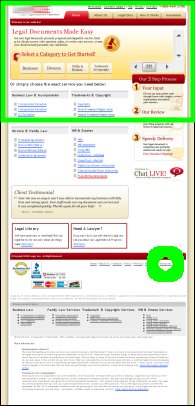
In order to find out whether they were offering a high quality linkback, I checked out their website.  On the right is a screenshot of their website.  It has nothing whatsoever to do with workers’ compensation.  The green circle is where they had the link to their “resources” page.  The green box at the top is the only part of their page that’s visible when you go to their page.

So, not only were they offering me a low quality link, but they were offering me a low quality link that no one would ever look for, let alone find.

While they were clearly making a terrible offer, the idea that they looked up my website in order to solicit a link was amusing.  My website’s gotten so big people want links from me!  Blog bigtime, baby!

Google Chrome
Google Chrome

Google jumped head fist into the browser war last week.

The big players at the moment are Internet Explorer, Firefox/Mozilla, Opera, and Safari (Mac).  From Google’s information about Chrome, it looks like it was designed based on Apple’s popular Webkit and Mozilla’s very popular Firefox.  An added benefit is that this new browser is open source.  Google’s online comic about Chrome and their new vision of how a web browser should look and behave is actually fairly interesting.

The other bit of good news is that I’ve downloaded and installed the beta version of Google’s Chrome in order to see whether it is compatible with this website and its web apps.

Good news!  Chrome works flawlessly with my workers’ compensation calculators!  So, feel free to use your choice of web broswer to calculate permanent disability percentages, temporary disability rates, life pension rates, and nearly every other kind of benefit available under California workers’ compensation law.

Google
Google

Google has a saying, “launch early and iterate.”  Launch your idea, get feedback, make it better, keep doing it! As a friend of mine has delicately suggested, I’m no Google.  This doesn’t mean I can’t learn from Google, right?

Two of the calculators I’ve been developing are a commutation calculator (for pre-1/1/2003 injuries) and a retroactive benefits calculator.  I’ll discuss the commutation calculators more closer to their launch.

However, today is the day I’m publicly launching my Retroactive Benefits calculator!  Its fairly straight-forward.  You tell it the weekly rate, start date, end date, payment date, and an interest rate.  It tells you how many days, how much is due, how many days the benefit was delayed, and how much is due with interest.

Take a look, play around with it, let me know what you think.  Drop me a line or post a comment.

A blogger I respect very much, Roger Dooley, recently posted about “The Power of FREE.” His Neuromarketing blog is mostly about the interplay between marketing and psychology. You should read the article for yourself, but the bottom line is that offering something for free is an incredible incentive – even where someone might get just as as good a deal for “almost free.”

Many people measure their success by their search engine ranking for their “target keywords.” I would wager that most people care about their Google ranking over other search engines. Most search engines alter the search results by placing paid advertisers at the top. Google does not sell search engine rankings. I would say this is one of the biggest reasons it’s considered the gold standard of search engines.

My own target keywords are “permanent disability calculator free.” I discovered a few days ago that this website is the top ranked Google result for these keywords!