Appeal (get it?)
Appeal (get it?)

Thanks to our friends at AppealsBoardReporter.com, we now have access to 22 amicus briefs filed in the Ogilvie and Almaraz/Guzman cases. 1 In late March 2009 the WCAB granted reconsideration of their recent Ogilvie and Almaraz/Guzman decisions – and invited the submission of amicus briefs.  You can read and download them here:

Who produced them?  Well, Ogilvie amicus briefs were filed by:

  • Morrow & Morrow
  • International Association of Rehabilitation Professionals
  • The Travelers Companies Inc.
  • Insurance Commissioner Steve Poizner
  • California Workers’ Compensation Institute

The Almaraz/Guzman briefs were filed by:

  • California Applicants’ Attorneys Association
  • California Chamber of Commerce-CSAC Excess Insurance Authority
  • County of Los Angeles
  • California Self-Insured Employers Association
  • California Society of Industrial Medicine and Surgery
  • California Workers’ Compensation Institute
  • Department of Industrial Relations Director John Duncan
  • Employers Direct Insurance Company
  • Phil Walker, Esq.
  • Phil Walker, Judicial Notice Request
  • Protected Insurance Program for Schools
  • Insurance Commissioner Steve Poizner
  • Safeway Inc.-The Boeing Co.-Schools Insurance Authority
  • San Diego Schools Joint Powers Authority
  • International Association of Rehabilitation Professionals
  • Morrow & Morrow
  • The Travelers Companies Inc.

After reviewing the above list, I have to wonder: Why doesn’t CAAA have an amicus brief for Ogilvie?  Does anyone know?

  1. Photo courtesy of Black Glenn.  Terrible pun courtesy of me. []

Thank you for the feedback!

I was recently sent feedback about the Ogilvie DFEC rebuttal calculator on this website. 1  Here’s how I’ve incorporated that feedback:

  1. Inputs. The calculator results repeats the inputs with the results.  This ensures that the answer provided gives you enough context when showing the calculation to the other side or when you go back to review your file.
  2. Email. You can now e-mail your calculations to yourself.
  3. Links. I’ve added a link to the various Employment Development Department and U.S. Dept of Labor, Bureau of Labor Statistics inside the calculator itself.  It doesn’t automatically obtain the information, but hopefully you will find this helpful.

There are two other issues I’m thinking about:

  1. An easy way to pull up the FEC rank of a particular body part.  Its kind of a pain to look up the body part, find the FEC rank, and then enter that into the calculator.  I’m thinking ways to simplify this process.  This shouldn’t be too bad to write.
  2. Rating using the Ogilvie DFEC adjusted whole person impairment.  This one will prove to be a difficult one to write in an intuitive fashion.

How would you change these calculators?  What else would you like to see?  What do you hate about them?  Shoot me an e-mail or leave a comment!

  1. Photo courtesy of biketrouble []

Getting an upgrade!
Getting an upgrade!

Late last week a user asked for a new feature.1  He wanted to be able to perform the Ogilvie DFEC rebuttal calculation and have the results e-mailed to him.2 Well, I built it!3

To e-mail yourself a calculation, perform the calculation as normal.  When the website returns your calculation, it will say “E-mail Me!”  Just click that button and it will send an e-mail to the address you used to register for this website.

However, here’s the cool part:  I’ve installed this new e-mail system into every calculator4 No more having to copy and paste!  Just click one button and your calculation will show up in your inbox!5

Although I intend this to be a paid-subscription-only feature, I am going to leave it open for all users while I get some feedback.  So, what do you think?  Please leave a comment or shoot me an e-mail!

  1. Thanks Dennis! []
  2. Photo courtesy of Vernhart []
  3. Why, what did you do with your Saturday morning? []
  4. I haven’t installed it in some of the EAMS lookup functions []
  5. If you filled in the boxes for Applicant, WCAB #, and File #, it will include this information in your e-mail as well.  This is only for your convenience and not a requirement. []

Wednesday afternoon I received an e-mail “Link Exchange Request” from another website.  That website is for legally related services, but really has nothing to do with what this website is about:  California workers’ compensation, nerdy technobabble, and random silliness.

This other website proposed that I put up a link to their website here.  Incoming website links are one of the primary tools search engines use to rank web pages, which is why people are always offering link exchanges.  Google’s PageRank system ranks a website on a scale from 0 to 10, with 10 being the best.  Like the Richter scale for earthquakes, PageRank scores require exponentially more energy to reach the next level.

Bad Link Exchange Offer

These links to my site can be “high quality” because they are from a website that also deals with California workers’ compensation, nerdy technobabble, or random silliness.  Or, they can be “low quality” because they have nothing to do with what my site is about.

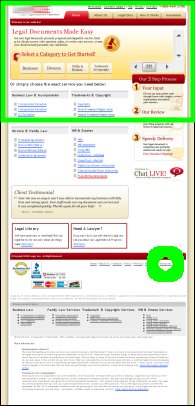
In order to find out whether they were offering a high quality linkback, I checked out their website.  On the right is a screenshot of their website.  It has nothing whatsoever to do with workers’ compensation.  The green circle is where they had the link to their “resources” page.  The green box at the top is the only part of their page that’s visible when you go to their page.

So, not only were they offering me a low quality link, but they were offering me a low quality link that no one would ever look for, let alone find.

While they were clearly making a terrible offer, the idea that they looked up my website in order to solicit a link was amusing.  My website’s gotten so big people want links from me!  Blog bigtime, baby!

Google Chrome
Google Chrome

Google jumped head fist into the browser war last week.

The big players at the moment are Internet Explorer, Firefox/Mozilla, Opera, and Safari (Mac).  From Google’s information about Chrome, it looks like it was designed based on Apple’s popular Webkit and Mozilla’s very popular Firefox.  An added benefit is that this new browser is open source.  Google’s online comic about Chrome and their new vision of how a web browser should look and behave is actually fairly interesting.

The other bit of good news is that I’ve downloaded and installed the beta version of Google’s Chrome in order to see whether it is compatible with this website and its web apps.

Good news!  Chrome works flawlessly with my workers’ compensation calculators!  So, feel free to use your choice of web broswer to calculate permanent disability percentages, temporary disability rates, life pension rates, and nearly every other kind of benefit available under California workers’ compensation law.

I am constantly trying to think of ways in which to improve this website and to make it a better resource for California Workers’ Compensation professionals.  If you’ve got an idea as to how I can improve this site, drop me a line and let me know.

  1. Links to online Medical Provider Network lists of physicians for a lot of different carriers
    • Click on “Medical Provider Network Links”
  2. The ability to search for occupational codes by the occupational title or to search for an occupational title by occupational code
    • Click on “Rating Calculator” and then “Occupation”
  3. Links to free searchable versions of the California Labor Code and California Code of Regulations
    • Click on “Workers’ Compensation Resource Links”
  4. Links to the State of California search pages for medical doctors, chiropractors, osteopaths, podiatrists, accupuncturists, optomotrists, psychologists, and dentists
    • Click on “Physician Search Links”
  5. Downloads for numerous Permanent Disability Rating Schedules1988, 1997, 2005, and the draft for 2009
  6. Combined Values Chart / Multiple Disabilities Table calculators
    • Click on “Rating Calculator” and then “CVC” or “MDT”
  7. A list of Commonly Used Terms in California Workers’ Compensation law

What’s that?  I only promised the top five PDRater.com features?  Don’t tell me you haven’t heard of the first rule of business:  Under promise and over deliver.

Happy Friday!

I’ve just put up an “Articles Page.”

I’m looking forward to publishing articles from California workers’ compensation professionals. I have a few requirements, but they’re nothing onerous. So, if you’re a doctor, attorney, claims examiner, judge, hearing representative, lien claimant, or anyone else who makes your living through Workers’ compensation, drop me a line.

Hands down, the most common question I get is some variation of “free as in FREE?” I was going to add this question to the “frequently asked questions” page, but it’s asked SO often I’ve got to post it here.

Q: Free as in FREE? WHY are these calculators free? Why would you do that?

A: I’ve got a lot of reasons for making these calculators free.

First, I made the decision to not charge for calculations. While this might change in the future, I don’t think it will. The pay-only features don’t give you more calculators or more reliable calculations. Instead, you get a lot of ways to make your calculations even quicker, easier, and convenient by improving the search functions and creating reports.

Second, there are other websites and programs that offer some of the same calculators I do. Some of those are free. No one would use this site unless it offered the same or better service at the same or better price (free).

Third, while you don’t have to pay me anything, I think the pay-only features are useful enough that people will want them. The pay-only features1 are all designed to save you a lot of time and frustration. Most California workers’ compensation professionals have extremely high case loads. Shaving a few minutes off every case would save considerably more time and money than this website’s paltry monthly subscription.

Fourth, as the saying goes, “do what you love and the money will follow.” Heaven help me, I really enjoy working on this site. Over the last year I’ve invested a lot of time in this project. 2  Some people collect stamps, some people build things out of toothpicks. I design and program web based calculators for workers’ compensation professionals.

  1. Better searching for body part codes, occupational codes, work restrictions, and e-mails with multiple side-by-side ratings, and more. []
  2. Please please don’t ask me how much. []