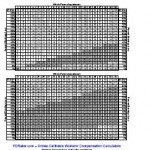
The Ogilvie mathematical proof has been available for several weeks for peer review. I’ve only received positive feedback.2 The above Ogilvie Adjustment Chart has been testing by myself and other workers’ compensation attorneys, but like everything else on this site is provided subject to all legal disclaimers.
I think we can dispense with the caption, just this once...
A defense attorney friend of mine called me up yesterday to say (I’m paraphrasing here), “You jackass. Thanks to your Ogilvie proof every Applicant’s attorney I know is calling me up, gloating, and asking for 18 points on top of the whole person impairment on every case! Why the hell did you do that???”1 My first thought was of my favorite quote from Swingers.2 What I actually said was something along the lines of:
It’s not like CAAA wouldn’t have found out about Ogilvie if it wasn’t for Jay Shergill mentioning it in a blog post.
For the moment, let’s set aside the issue of whether California’s injured workers have gotten a raw deal since SB899. Suppose there’s an injured worker with a finger injury, stays on temporary disability for two years, and is immediately made permanent and stationary. If instead they get a 0% WPI, they get nothing. If they gets a 1% WPI, Ogilvie tells us this person gets a DFEC adjusted WPI of 19%.
Nearly every litigated case involves an extended period of temporary disability and a whole person impairment less than 45.4Ogilvie effectively removes the first 18% permanent partial disability levels.
I really don’t think the WCAB intended this consequence. Don’t get upset with me – as long as Ogilvie is the law I might as well make Ogilvie calculations easy for you, right?5
Get ready to stop paying people to do Ogilvie calculations, recycle your Gearheart/Gerlach handouts, and delete your Frost Excel spreadsheet.1 We’re about to go all “Beautiful Mind.”
Yesterday while at the Oakland WCAB an Applicant’s attorney mentioned he noticed an interesting trend in the Ogilvie formula. 23 He said that whenever he does an Ogilvie calculation for someone with a 100% earnings loss and a modest WPI, the WPI is always increased by 18. 4
I ran a number of test calculations on this theory and it appeared to be right. My calculations show that up to a WPI of 44 the increase appears to always be 18.1, but the last “0.1” always gets rounded down. However, appearing to be right just isn’t good enough for me. And, because I am just truly that nerd, here’s the fully mathematical proof:
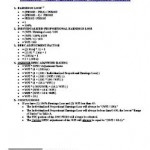
Let’s break down the calculations at the heart of Ogilvie:
If you have an Applicant with a 100% post injury earnings loss and a WPI of 44 or less, you should rebut the FEC and arrive at an adjusted WPI that is equal to the original WPI plus 18.1.
Therefore, I propose a new Ogilvie formula that will be easy for anyone to remember:
Step 1: If the injured worker has a 100% earnings loss and a WPI of 44 or less, add 18.1 to the WPI and round down.
Step 2: If the injured worker has less than 100% earnings loss or a WPI of 45 or higher, go to Step 3.
Step 3: For heaven’s sake, just make your life easier and use the calculators here at PDRater.com.
I’ve been working on an easy way to allow a user to look up and quickly insert the FEC rank for the affected body part. I finally got around to building it a few days ago and launched it this morning. Please give it a shot and let me know what you think.
Type in the FEC rank OR click “FEC Rank (1-8)” and click on the injured body part. It will look up the FEC rank and insert it for you.
Type in the “Whole Person Impairment”
Type in the “Post Injury Earnings of Applicant”
Type in the “Post Injury Earnings of Similarly Situated Employees” OR click the link to obtain some information from the EDD Labor Market Information Division (LMID) and US Department of Labor, Bureau of Labor Statistics (BLS).
If you can think of a way for me to make this calculator even easier, please let me know. 2
Permanent disability calculators that will fit in any pocket!
I was at the San Jose WCAB on Friday. Since recently discovering that I could run this website’s permanent disability rating calculators from my phone’s web browser, this was the first time I left my rating manual, money chart, and date wheel in the car.1
It was great. That morning I used my phone to:
Find the ADJ number associated with the legacy SJO number on my file
The benefit for me is not so much that I don’t have to carry the rating manuals, dollar value charts, and date wheels. Unlike these tools, my phone is not something I’m going to misplace or loan and never see again.
The best part is that if I want to refer back to the calculation I just performed, I can just e-mail it to myself!
Since launching this website I’ve given a lot of thought to support for cell phones. There just are not many phones that can run these calculators.2 The glaring and notable exception is the iPhone.
Amusingly, one of this website’s users has asked for an “iPhone app” version of this site. Seriously, you’ve got one of the few phones that can use this site and that’s not good enough for you? (Thanks Chris!)
It would be more correct to say there are not many phones that support javascript and AJAX well enough to interact with this website in a meaningful fashion. [↩]
Probably a lot more interesting for me than it is for you… [↩]
On Monday April 6, 2009 the WCAB issued three Orders Granting Reconsideration and Order Allowing Amicus Briefs (en banc) in Ogilvie and Almaraz/Guzman. For your review:
The WCAB has granted SCIF’s petition for reconsideration in Almaraz, granting reconsideration on their own motion in Guzman, and the parties’ petitions for reconsideration in Ogilvie. They have granted reconsideration on these cases to, “afford us a sufficient opporutnity to study the issues.”2
Any interested party may file an amicus brief no later than May 1, 2009 at 5pm.
I was recently sent feedback about the Ogilvie DFEC rebuttal calculator on this website. 1 Here’s how I’ve incorporated that feedback:
Inputs. The calculator results repeats the inputs with the results. This ensures that the answer provided gives you enough context when showing the calculation to the other side or when you go back to review your file.
Links. I’ve added a link to the various Employment Development Department and U.S. Dept of Labor, Bureau of Labor Statistics inside the calculator itself. It doesn’t automatically obtain the information, but hopefully you will find this helpful.
There are two other issues I’m thinking about:
An easy way to pull up the FEC rank of a particular body part. Its kind of a pain to look up the body part, find the FEC rank, and then enter that into the calculator. I’m thinking ways to simplify this process. This shouldn’t be too bad to write.